GTranslate Support Is Here: TTSWP 3.3.0 Release Notes
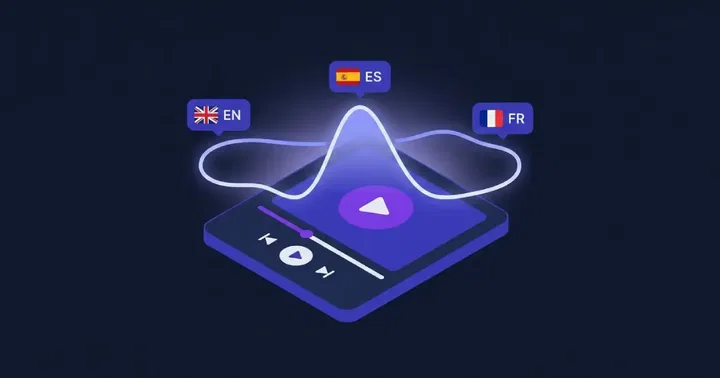
Text to Speech - TTSWP 3.3.0 adds GTranslate support. You can now generate one audio file per destination language, and the player swaps to the right file in the browser when a visitor changes language. No page reload, no extra plugin. This release completes the multilingual lineup alongside WPML, Polylang, TranslatePress, and Weglot.
If you already run GTranslate on your WordPress site, this is the update that lets your narrated posts follow the visitor's language choice without any workaround.
What's new in 3.3.0
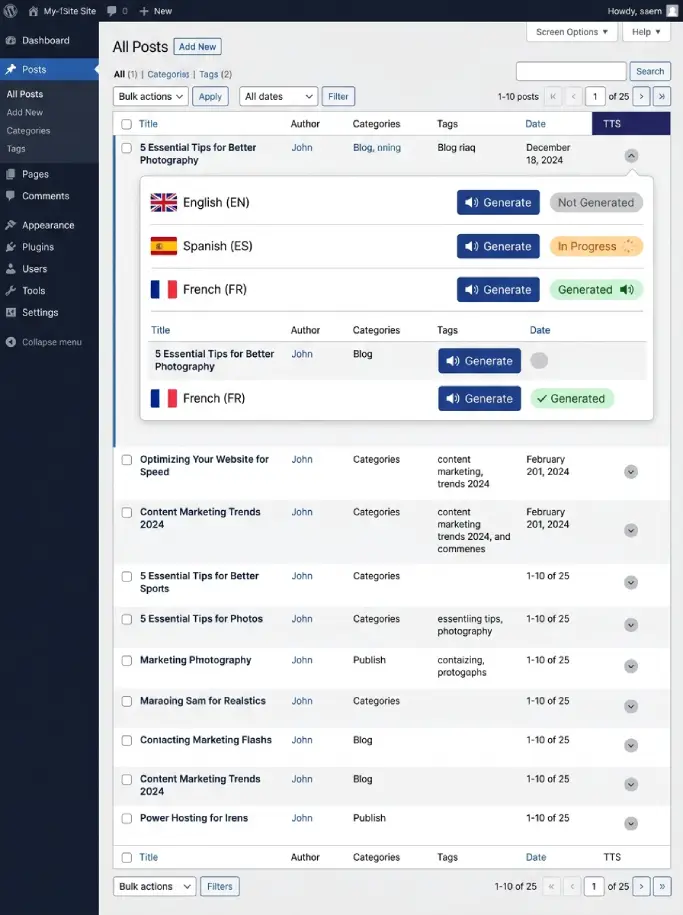
Three things ship in this release. A GTranslate toggle in settings turns the integration on. The Posts and Pages list now shows one row per language in the TTS column, so you can generate audio for each language separately. And every page now carries a small "language to audio file" map that the player reads in the browser to swap files when the visitor switches language.
- GTranslate integration toggle in TTSWP settings
- Per-language rows in the TTS column of the post list
- Client-side audio swapping via a language-to-file map attached to each page
- Automatic locale code normalization for variants like nb, nn, and zh-CN
- Custom audio override per language, same as our other multilingual integrations
Why GTranslate needs a different method
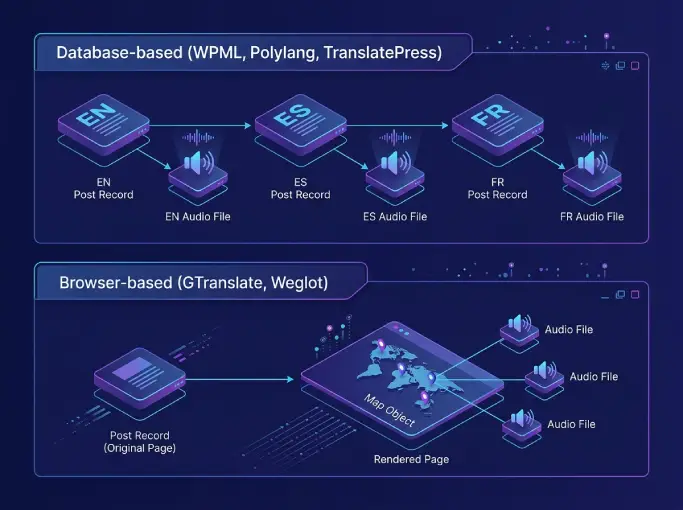
GTranslate translates pages in the browser. The server only ever sees the default language, so the database has no record of a Spanish or French version of the post. Most TTS plugins read the post from the database and play whatever audio belongs to that single record, which means visitors hear the default language no matter what they pick in the language switcher.
Compare that to WPML, Polylang, and TranslatePress. Those plugins store each translation as its own post or string in the database. TTSWP can generate one audio file per translated record and serve the right one based on the URL or stored locale.
GTranslate and Weglot work differently. Translation happens client-side or via a proxy, so the database stays single-language. TTSWP 3.3.0 handles GTranslate by attaching a map of language codes to audio URLs directly to the page. When the visitor switches language in the GTranslate widget, our player JavaScript detects the change, reads the map, and switches the audio source. The page does not reload.
Turn it on in three steps
The integration ships disabled by default. Once you update to 3.3.0, flip it on like this.
- Open the TTSWP settings page in your WordPress admin.
- Find the GTranslate integration toggle.
- Save changes.
Three requirements have to be met. You need a paid TTSWP plan, GTranslate must be active with at least one destination language configured, and your site has to be connected to the TTSWP backend. If GTranslate is not detected or you are on the free plan, the toggle stays locked with an inline explanation.
Full setup notes live in the GTranslate integration docs.
Map a voice per language
Once the toggle is on, the Language Voice Mapping screen becomes the place where you assign a voice to each language. Pick a Spanish voice for Spanish, a French voice for French, and so on.
Languages without a mapped voice fall back to the default voice you set at the plugin level. That fallback is intentional. It means you can turn the integration on, generate audio for the languages you care about, and leave the rest on the default while you decide.
The mapping screen is shared across all our multilingual integrations. See Language Voice Mapping for the full list of behaviors and edge cases.
Generate audio per language
Open the Posts or Pages list in WordPress. The TTS column now shows one row per destination language. Each row has its own generate button, status indicator, and link to the resulting file.
You can also use a custom recording per language. Upload your own MP3 to override the generated audio for any language slot. The override behavior matches what our other multilingual integrations already support. See custom audio for the upload steps.
What visitors hear
The page loads in the default language. The language-to-audio map travels with the HTML, embedded in a small data attribute on the player. When the visitor opens the GTranslate widget and picks a new language, our player JavaScript catches the event, looks up the matching audio file, and swaps the source. Playback can resume in the new voice without reloading the page.
If a language has no audio assigned and no default fallback, the player hides itself for that language. We chose to hide rather than fall back to a mismatched voice. A French page with an English voiceover is worse than no player at all.
Language codes handled for you
WordPress, GTranslate, and ElevenLabs do not always agree on locale codes. Norwegian Bokmal ships as nb in some places and no in others. Simplified Chinese is zh-CN in GTranslate but often just zh in voice catalogs.
TTSWP 3.3.0 normalizes these for you. nb and nn map to no. zh-CN maps to zh. You do not need to track which code goes where. Pick the language in GTranslate, map a voice in TTSWP, and the integration handles the translation between code formats.
The full multilingual lineup
With GTranslate added, TTSWP now covers every common WordPress translation method. The split is between plugins that store translations in the database and plugins that translate in the browser or via a proxy.
| Plugin | Translation method | TTSWP approach | Docs |
|---|---|---|---|
| WPML | Database, separate post per language | One audio file per translated post | WPML |
| Polylang | Database, separate post per language | One audio file per translated post | Polylang |
| TranslatePress | Database, string-level translations | One audio file per language version | TranslatePress |
| Weglot | Browser and proxy | Language-to-audio map, client-side swap | Weglot |
| GTranslate | Browser | Language-to-audio map, client-side swap | GTranslate |
If you run a multilingual WordPress site and have been waiting for narration to catch up to your translation stack, the answer is now the same regardless of which translation plugin you picked.
Frequently asked questions
Does GTranslate translate the audio file itself?
No. GTranslate translates page text in the browser. Audio is a binary file, not text, so GTranslate cannot touch it. TTSWP generates a separate audio file per language ahead of time and serves the right one when the visitor switches language. The translation and the narration are produced by two different systems, then matched at playback time.
Do I need a paid plan to use the GTranslate integration?
Yes. The GTranslate toggle is available on paid TTSWP plans only. If you are on the free plan the toggle is visible but locked, with a link to pricing. Free plans still get the core text-to-speech features. Multilingual integrations sit on the paid tiers because they generate multiple files per post and use more credits.
What happens if a language has no audio file?
The player hides for that language. We considered falling back to the default-language audio, but a mismatched voice on a translated page hurts trust more than a missing player. If you want a fallback, generate audio for that language or upload a custom recording. The player reappears as soon as a matching file is available.
Can I use my own recording instead of a generated voice?
Yes. Each language slot on the post supports a custom audio upload. Use this if you have professional voice talent for one language and want generated audio for the rest, or if you need to match an existing brand voice. The override is per language, so a post can mix generated and custom audio across its translations. See the custom audio docs for upload details.
Does it work with GTranslate subdirectories and subdomains?
Yes. Both URL structures are supported. The integration reads the active language from the GTranslate runtime, not from the URL, so whether your French version sits at example.com/fr/ or fr.example.com the player swaps to the French audio file. If you change your GTranslate URL structure later, no TTSWP reconfiguration is needed.
Next step
Update to TTSWP 3.3.0 from your WordPress plugins screen, open settings, turn on the GTranslate integration, map a voice per language, then generate audio from the Posts list. Test by loading a post and switching language with the GTranslate widget. The player should swap audio without reloading the page.
For step-by-step screenshots and edge cases, head to the GTranslate integration docs. If you run into a code that does not map cleanly, contact us and we will add it to the normalization list.