Meet WCAG accessibility standards
Add a read-aloud audio player so visitors with visual impairments, dyslexia, or language barriers can listen to your content. TTSWP handles WCAG 2.1 AA compliance with no coding.
Text to Speech for WordPress
Converts your content into natural audio. Your visitors can listen instead of reading. It works automatically when you publish and requires no setup.
Free plugin · Pro from $49/year · No credit card needed
Hear your content as natural audio
Demo limit reached for today. Install the plugin and keep going on your own site.
Install free from WordPress.org →No signup required · Try it instantly
TTSWP is a text to speech plugin for WordPress that turns posts, pages, and WooCommerce product descriptions into MP3 audio files. The plugin generates the files automatically using AI voices the moment you hit publish. A native audio player appears on the page so visitors can listen instead of read.
Adding audio increases time on page. It also helps the site meet WCAG accessibility requirements.
Trusted by teams at
Downloaded 27,000+ times and used on sites worldwide
TTSWP turns posts and pages into MP3 audio files directly from your dashboard. Install the plugin, publish your content, and a customizable audio player appears at the top of the page.
In your WordPress admin go to Plugins, then Add New, and search for TTSWP. Or install it straight from WordPress.org. The Free plan is included and needs no credit card.
Audio is created automatically when you publish or update. Prefer to do it yourself? Generate, regenerate, or bulk-create audio for any post, page, or WooCommerce product right from the plugin's My Content & Audio page.
TTSWP sends your text to the AI on publish and saves a 44.1 kHz MP3 file to your server, ready to stream.
The audio player loads at the top of your content. Visitors press play and stay on the page longer.
Downloaded 27,000+ times by site owners. Rated 5.0 out of 5 from 6 reviews on the official plugin directory.
"The setup was incredibly easy, even for someone without a technical background. Within minutes, I had high-quality audio versions of my posts ready to go."
"I had some issues, the plugin did not support my builder, but it got fixed really quick. Plugin works great, does exactly what it supposed to."
"OMG Thomas was amazing. Fixed my initial support question overnight. I suggested a few enhancements, and the very next day 95% of them were implemented. You CANNOT get better support than that."
Audio makes content accessible under WCAG, keeps listeners on the page 2-3x longer, reaches users who prefer to listen, and turns skimmers into completers.
Add a read-aloud audio player so visitors with visual impairments, dyslexia, or language barriers can listen to your content. TTSWP handles WCAG 2.1 AA compliance with no coding.
Visitors who listen stay 2-3x longer than those who skim. Audio holds attention through the full article, extending time on page and improving the engagement signals search engines value.
Many visitors don't have time to sit and read long articles. Audio lets them follow your content while commuting, exercising, or working, even with the phone in their pocket.
Visitors who press play are far less likely to leave. Natural AI voices keep them through the full article, while robotic-sounding tools cause people to bounce within seconds.
TTSWP adds automatic audio to long-form blog posts, WooCommerce product pages, how-to guides, and daily news articles.
Articles over 1,000 words where readers quit before finishing. A read-aloud option lets visitors rest their eyes and listen through, raising content completion.
Shoppers scroll through product images while listening to descriptions, specs, and reviews. The hands-free browsing keeps them engaged on every product page.
Recipes, repair guides, and tech tutorials where hands are full. Audio reads each step aloud, so users never need to scroll back to the screen.
News sites and knowledge bases publish often. Audio generates the moment you hit publish, so every new article has a listen option without manual work.
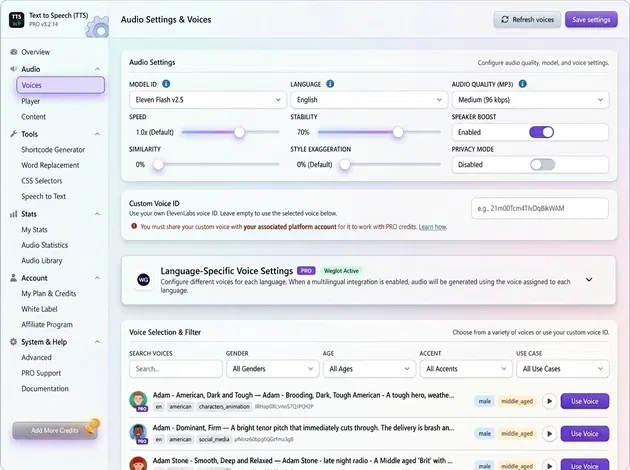
Customize every detail, from 600+ ElevenLabs voices and language settings to fine-tuned speed, stability, and audio quality.
Premium voices powered by ElevenLabs across 70+ languages. Pick a voice that matches your brand and audience.
Studio-grade audio that plays on every device, with ARIA labels and full keyboard control for accessibility.
Assign different voices per language with WPML, Polylang, Weglot, or TranslatePress integration.
Generate audio for all existing posts at once. No need to update each article one by one.
Adjust speed, stability, similarity, style exaggeration, and speaker boost from a single dashboard.
Pin the audio player to the bottom of the screen so visitors keep listening while they navigate the rest of your site.
TTSWP gives you the tools you need to add audio without changing how you publish content.
Add audio automatically to posts, pages, and custom post types. Use the shortcode to drop the player anywhere else on your site.
Auto-narrate WooCommerce product descriptions and run inside Elementor, Divi, or Gutenberg without conflicts.
Audio is created when you publish, then refreshes automatically when you edit the article. No manual regeneration needed.
Premium voices powered by ElevenLabs v2 and v3 models. Pick a voice that matches your brand and audience.
Clear audio at 44.1 kHz that plays on any device. The player ships with ARIA labels and full keyboard control for screen readers.
Generate audio for all existing posts at once. No need to update each article one by one.
Built to work with WP Rocket, LiteSpeed Cache, and W3 Total Cache. The player is lazy-loaded and does not affect Core Web Vitals.
Manage every generated MP3 from one dashboard. Track plays per post and see how visitors engage with your audio.
Pin the audio player to the bottom of the screen so visitors keep listening while they navigate the rest of your site.
Most other plugins require manual work and give you limited control. TTSWP is built to work directly inside your dashboard.
| Features | TTSWP | Most other TTS plugins |
|---|---|---|
|
Automatic audio generation
|
Yes, on publish
|
No
|
|
Dashboard integration
|
Native dashboard control
|
External third-party site
|
|
Voice quality
|
Premium ElevenLabs models
|
Standard web voices
|
|
Player control
|
Built into your site
|
Limited or external
|
|
WooCommerce and custom content
|
Native WooCommerce support
|
No WooCommerce integration
|
|
Weglot multilingual support
|
Yes, plus WPML / Polylang / TranslatePress
|
No Weglot integration
|
|
Bulk generation
|
1-click for all existing posts
|
Manual one-by-one update
|
|
Audio file storage
|
Your server, or AWS S3 on Pro
|
Hosted on third-party servers
|
|
Accessibility (WCAG)
|
ARIA-labeled player
|
Basic HTML player only
|
Add audio to your content and let visitors listen instead of reading. Get started in minutes with TTSWP.
Free to start. No credit card required. No coding needed.
From the blog
See all articlesLearn how to use audio on your site, improve accessibility, and get more from your content.
 WordPress Tips
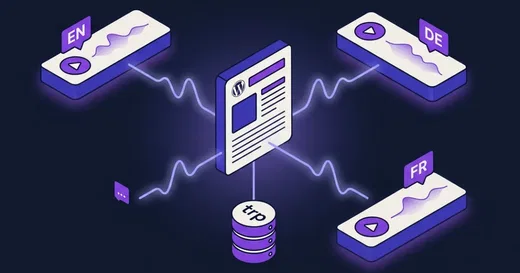
TranslatePress translates rendered HTML, not duplicate posts. Here is how to make text to speech match every language, without broken audio.
Read more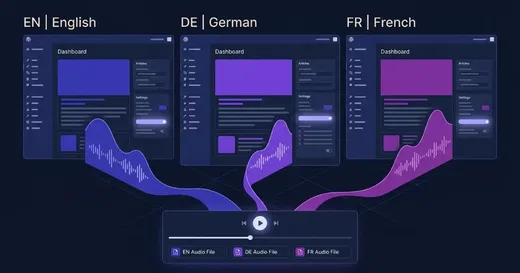 WordPress Tips
How to add Polylang text to speech that generates one audio file per translation, picks the right voice per language, and survives caching.
Read more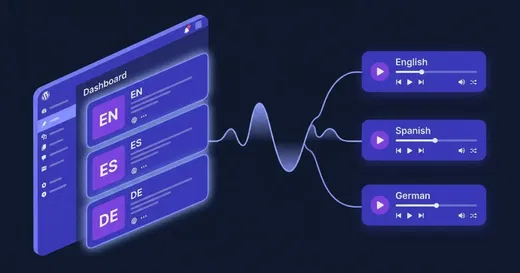 WordPress Tips
How to add wpml text to speech that picks the right voice per language, generates separate audio per translation, and survives AJAX language detection bugs.
Read more