Text to Speech for WPML Sites: What Actually Works
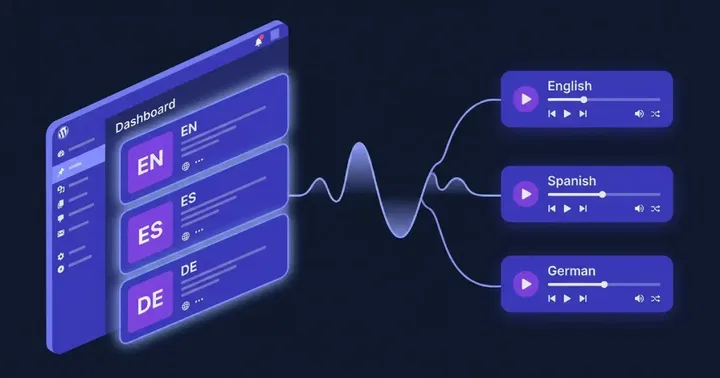
If you run a WPML site and want every translation to have its own narration in the right voice, the plugin you pick has to do three things correctly: read the translated post, generate a separate audio file per language, and detect the current language inside AJAX calls. Most TTS plugins fail at one of those. Text to Speech - TTSWP was built to handle all three.
This post is the practical counterpart to our Weglot guide. The technical angle is the opposite, so we will start by explaining why.
Running Polylang instead of WPML? We have a dedicated guide to text to speech on Polylang sites too.
WPML stores translations as real posts. Weglot does not.
WPML and Weglot solve multilingual WordPress in very different ways, and that difference decides what a TTS plugin needs to do.
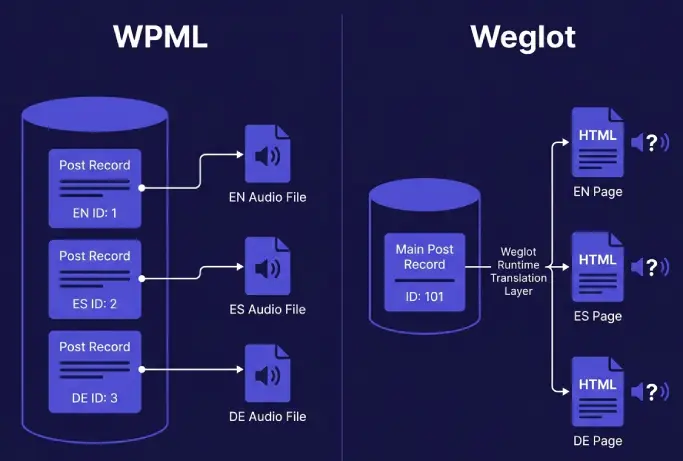
WPML creates a separate post record for every translation. The English version of an article lives in wp_posts with one ID. The Spanish version lives in the same table with a different ID. WPML links them through the icl_translations table. The translated text is real text in the database, edited by a human or by WPML’s machine translation pipeline.
Weglot is the opposite. The database holds only the original. Translations are produced at runtime and injected into the output HTML before the page reaches the browser. A plugin reading from get_post() on a Weglot site only ever sees the source language.
For TTS this changes everything. On WPML, reading the post content from the database is correct. The translated text is already there. The failure modes are about which post the plugin reads, which language it thinks it is in, and whether it stores one audio file or many.
The four failure modes WPML TTS plugins hit
We tested several setups on a multilingual WPML staging site. The same four issues kept showing up. If your current plugin has any of these, the audio your visitors hear is not the audio you think you published.
1. Wrong-language audio because of AJAX language detection
This is the silent killer. Most TTS players fetch the audio file or stream URL through an admin-ajax or REST request after the page loads. Inside that request, WordPress has lost the front-end URL context. The plugin asks WPML “what language are we in?” and gets the wrong answer.
The common cause is the old ICL_LANGUAGE_CODE constant. It is defined once early in the request and reflects the language WPML detected at bootstrap. During an AJAX call triggered from a Spanish page, that constant often returns the default language, not Spanish. The TTS plugin then generates English audio for a Spanish article, or pulls a cached English file and plays it under the Spanish player.
The correct approach is to use WPML’s runtime filters. The wpml_current_language filter returns the active language at the moment you ask. The wpml_post_language_details hook returns the language a specific post belongs to, which is even safer because it ties the audio to the post ID rather than the request state.
How to spot it as a reader: open a translated article, hit play, and listen for the first second of audio. If you hear an English voice on a non-English page, your plugin is using the wrong language detection path.
2. One audio file shared across all translations
Some plugins generate audio when the original post is published and attach the same file to every translation. That is fast and cheap. It is also wrong. A Spanish reader gets English narration, or a synthetic accent that does not match the page they are reading.
Because WPML translations are separate posts with separate IDs, the correct behavior is to generate a new audio file per translated post. Each file is stored against its own post ID and served only to that translation. TTSWP follows this model and uses the post ID, not the original ID, as the cache key.
3. The same voice reading every language
A French article narrated by an English-trained voice sounds wrong even when the words are correct. ElevenLabs voices carry accent and prosody from their training data. A voice trained on American English will read French with an American accent unless you assign a voice that matches the target language.
TTSWP lets you map one ElevenLabs voice to each WPML language. The Spanish translation gets a Spanish-trained voice, the German translation gets a German voice, and so on. See the language-to-voice mapping docs for the exact setup.
4. Schema that does not declare the language of the audio
This is the AEO detail most plugins ignore. The AudioObject structured data should carry an inLanguage property. The value should be an IETF BCP 47 tag (es, de, nb-NO) that matches the page’s hreflang.
A matching inLanguage value gives search engines and AI tools a clear, machine-readable signal about which language the audio is in. It reinforces the hreflang signal already on the page. When the schema is missing, or every translation shares the same English-only value, that signal disappears and language-aware systems cannot tell the versions apart. We cover how AI engines treat audio in our AEO and audio guide.
Picking the right ElevenLabs model for WPML coverage
ElevenLabs ships several models, and they do not all cover the same languages. If WPML serves a language ElevenLabs does not support in the model you pick, you cannot narrate that translation cleanly.
The current coverage as of 2026:
- Multilingual v2 supports 29 languages, including English, Spanish, French, German, Italian, Portuguese, Dutch, Polish, Swedish, Danish, Finnish, Turkish, Arabic, Hindi, Japanese, Korean, and Chinese.
- Flash v2.5 supports 32 languages, all of the v2 languages plus Hungarian, Norwegian, and Vietnamese, with roughly 75 ms model latency.
- Eleven v3 supports 74 languages, the broadest coverage of any model. It comes with one constraint that outweighs its extra features: it is not built for real-time use. ElevenLabs states this directly. The model is larger and uses a higher-fidelity voice codec, so generation takes longer to run. For real-time or conversational use cases, ElevenLabs recommends Flash v2.5 instead.
For a WPML site with a Norwegian translation, Multilingual v2 will not cover it. Flash v2.5 will. For a site that needs a language only v3 supports, you accept higher generation latency in exchange for coverage. TTSWP routes each language to a voice you choose, so you can mix models as needed.
How to test if your TTS plugin really handles WPML
You do not need to read code to check this. Five minutes in the browser tells you what is happening.
- Switch language. Open the original article, then switch to a translation using the WPML language switcher. Confirm the URL changes (for example to
/es/) and the post slug is the translated slug. - Press play and listen. The voice should match the page language. An English voice on a Spanish page means the plugin failed step one.
- Inspect the audio URL. Right-click the player, copy the audio source. Compare it to the audio URL on the original article. If both URLs are identical across languages, the plugin is sharing one file.
- View the page source and search for
AudioObject. Look for aninLanguagefield. It should equal the page language code. If the field is missing or alwaysen, the schema is wrong. - Check hreflang. The
inLanguageon the audio should match thehreflangon the page. Mismatches confuse AI search and break per-language citation.
Run that checklist before you buy anything. It works on any TTS plugin, not just TTSWP.
What a correct WPML TTS setup looks like
Here is what we recommend on a production WPML site. Each step maps to a failure mode above.
| Concern | Wrong approach | Correct approach |
|---|---|---|
| Language in AJAX | ICL_LANGUAGE_CODE constant | wpml_current_language filter or wpml_post_language_details tied to the post ID |
| Audio storage | One file shared across translations | One file per translated post ID, served from CDN |
| Voice selection | Same voice for every language | One ElevenLabs voice mapped per WPML language |
| Model selection | Hardcoded model for all languages | Per-language choice between Multilingual v2, Flash v2.5, or Eleven v3 |
| Schema | Missing or English-only AudioObject | AudioObject with inLanguage matching page hreflang |
TTSWP follows the right-hand column by default. The plugin reads the translated post directly, generates a fresh audio file per post ID, delivers it through CloudFront, and emits per-language AudioObject schema. The WPML integration docs walk through the setup.
One honest limitation
Per-language audio costs more characters than one shared file. If you publish a 1500-word article and translate it into five languages, you pay for five generations, not one. That is the price of correctness. Sharing a single file would be cheaper, but the audio would not match the page. We do not recommend trading reader experience for credit savings, and we say so in the credits docs.
If budget is tight, generate audio only for the languages that get real traffic. WPML’s language stats and your analytics will tell you which translations are worth narrating.
Frequently asked questions
Does TTSWP support WPML out of the box?
Yes. Once both plugins are active, TTSWP detects WPML, reads the translated post content for each language, and stores a separate audio file per translation. You assign one voice per language in the TTSWP settings, then publish translations as usual. Audio regenerates when a translation is updated. See the WPML integration page for setup steps.
Why does my current TTS plugin read everything in English on translated pages?
The most likely cause is the deprecated ICL_LANGUAGE_CODE constant inside an AJAX call. During AJAX, that constant often returns the site’s default language instead of the active one, so the plugin generates or serves English audio on non-English pages. The fix is to switch to the wpml_current_language filter or read the language from the post ID directly.
Can I use different ElevenLabs voices per WPML language?
Yes. TTSWP maps one ElevenLabs voice to each WPML language. Spanish translations are read by a Spanish voice, German by a German voice, and so on. You can also pick different models per language, which matters when a target language is only supported by Flash v2.5 or Eleven v3 and not Multilingual v2.
What languages does ElevenLabs cover for WPML sites?
Multilingual v2 covers 29 languages, Flash v2.5 covers 32 (adding Norwegian, Hungarian, and Vietnamese), and Eleven v3 covers 74 languages. Pick the model with the broadest coverage your latency budget allows. Most WPML sites get good results from Multilingual v2 or Flash v2.5. Sites with rarer languages move those translations to Eleven v3.
Does TTSWP emit per-language schema for AI search?
Yes. TTSWP outputs an AudioObject per translated post with an inLanguage value that matches the page’s hreflang. This gives search engines and AI tools a clear signal about which audio belongs to which language version of the article, instead of leaving every translation tagged the same way.
Next step
Run the five-step browser test on whatever TTS plugin you have today. If any step fails, that is the failure mode you need to fix before adding more translations. If you want a setup that handles all five out of the box, install Text to Speech - TTSWP from WordPress.org, connect it to the TTSWP backend, and assign one voice per WPML language. The plugin handles the rest.