Text to Speech for TranslatePress: What Works
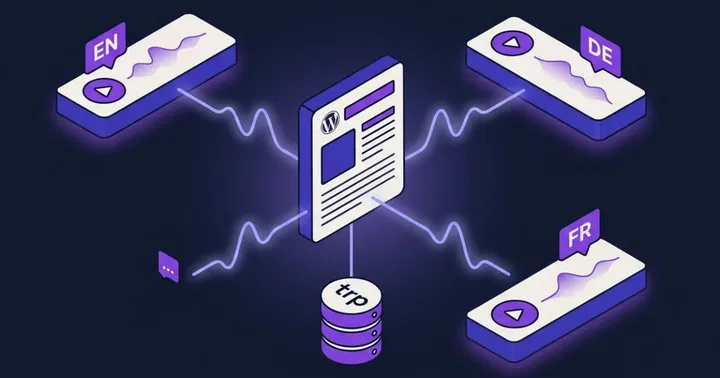
TranslatePress translates the rendered HTML of a page at request time and stores every translation in local database tables. There is one post ID per article, and language switches happen through trp_translate(), not through duplicated posts. That single fact reshapes how text to speech has to work on a TranslatePress site.
This is the fifth and final post in our multilingual TTS series. We already covered WPML, Polylang, Weglot, and GTranslate. TranslatePress sits between them technically, and the audio setup reflects that.
How TranslatePress differs from WPML, Polylang, and Weglot
WPML and Polylang create a separate post for every language. Each translation has its own post ID, its own post_content, and its own permalink. Audio generation is straightforward because every language is a distinct WordPress object.
Weglot takes the opposite approach. Translations live on Weglot's servers and get injected into the page through a proxy or subdomain. The original WordPress database never sees the translated text, which is why server-side TTS on Weglot is difficult without JavaScript hooks.
TranslatePress is the middle ground. There is one post per article, so post_content only contains the default language. But every translation lives locally in your WordPress database, in the wp_trp_ tables. You can read them, you can query them, and you can pass them to a TTS engine. That changes the audio approach compared to any of the other four plugins.
Where the translations actually live
TranslatePress stores translations in dedicated tables prefixed with wp_trp_. Each language pair gets its own dictionary table, keyed as wp_trp_dictionary_<source>_<target>. There is also wp_trp_original_strings for the source strings and gettext tables for theme and plugin translations.
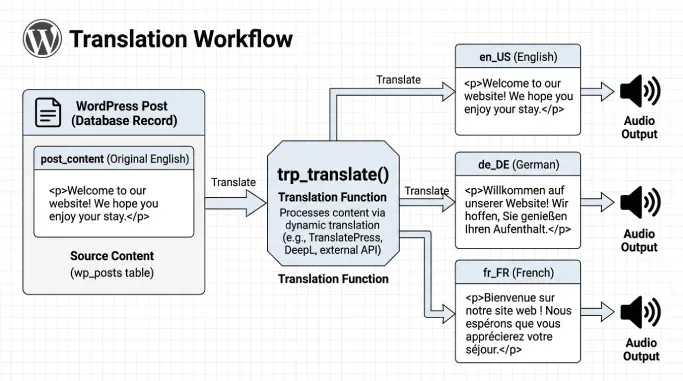
Storage is directional. A German translation of an English site lives in the English-to-German dictionary. Reading it back requires the same direction. The public function you care about is trp_translate(), which takes a string of content and a language code and returns the translated version.
if ( function_exists( 'trp_translate' ) ) {
    $translated = trp_translate( $post->post_content, 'de_DE' );
    // Pass $translated to the TTS engine, not $post->post_content.
}
For a TTS integration, that function is the source of truth. Reading post_content directly gives you the default language every time, no matter which URL the visitor is on. See the TranslatePress integration docs for how TTSWP handles this on our side.
The locale-code trap
TranslatePress uses full locale codes, not slugs. German is de_DE, not de. French is fr_FR. Brazilian Portuguese is pt_BR. Any integration that assumes Polylang-style two-letter slugs will silently fail on TranslatePress.
The TranslatePress developer docs are explicit about this. The language code passed to trp_translate() is the locale from Settings, TranslatePress, General, and it is not necessarily the same as the language slug in the URL. A bare slug like de matches no dictionary, so the function falls back to the original string with no warning. If you write custom code, normalize your language codes before calling trp_translate(), and store the same locale format alongside your audio files so you can match them back later.
URL structure and caching
TranslatePress uses a subdirectory per language by default. Your English page lives at site.com/blog/post and the German version at site.com/de/blog/post. There is also an option to use a subdirectory for the default language, which makes all languages symmetrical.
This is the good case for caching. Distinct URLs mean distinct cache keys per language. WP Rocket, LiteSpeed, and CDN edge caches all treat /de/blog/post as a separate resource from /blog/post, so your German audio file gets served with the German page and your English audio with the English page. Our caching integration docs cover the exclusion rules if you need them.
The one risk is the paid Automatic User Language Detection add-on. It redirects visitors based on browser language, which can collide with page caches and serve the wrong redirect to the wrong user. We covered the same pattern in the Polylang post. Fewer TranslatePress sites run detection because it is a paid add-on, but if you use it, exclude the redirect logic from the cache.
The player UI translation problem
This one is unique to TranslatePress. The plugin detects and translates strings inserted by JavaScript, which is unusual. Most translation tools ignore JS-rendered content. TranslatePress catches it in the DOM after render and offers to translate it.
The side effect is that audio player labels like "Play", "Pause", and "Listen to this article" show up in the TranslatePress editor as translatable strings. If those strings get machine-translated without review, the player can end up with awkward or wrong button text, and worse, mistranslated accessibility labels that confuse screen readers.
Two fixes exist inside TranslatePress. Add the data-no-translation attribute to any element you want excluded. Or use the exclusion selectors under Advanced Settings to skip whole containers by CSS selector. Both are documented in TranslatePress's own settings. For the TTSWP player specifically, exclude the player wrapper by class, then let our translated player labels come through the plugin's own language files.
What to exclude
- The audio player container element
- ARIA labels on play, pause, and progress controls
- Time displays and duration counters
- Any voice-name or language-name labels rendered by TTSWP
If you want to restyle the player after excluding it, our custom CSS docs cover the selectors.
The content-edit desync problem
TranslatePress ties every translation to the exact source string. Edit the original, and TranslatePress creates a new source string and detaches the existing translation. Translation Memory suggests the old translation back, but until a human confirms it, the target language falls back to the source.
For text to speech, that means audio can drift out of sync with translated text after any edit. A comma added in English detaches every language's translation for that string. Your German audio still says the old sentence, but the visible German text now says the new one.
Practical checklist after editing content:
- Confirm the new source string in the TranslatePress editor for each active language.
- Regenerate audio on the default-language post first.
- Regenerate audio for each language, then play the audio on each localized URL to confirm the new file matches the visible text.
- Clear your page cache for every localized URL, not just the default.
Setting up TTSWP on a TranslatePress site
Here is the current flow. The integration docs always describe the latest behaviour.
- Install TTSWP from the WordPress.org plugin directory. The install guide walks through it.
- Connect the plugin to the TTSWP backend. Free plans include welcome credits so you can test the full flow before paying. See connect your site.
- Confirm TranslatePress is active and that at least one target language is configured with a full locale code.
- Map a voice per language using the language-to-voice mapping. Assign a German voice to
de_DE, a French voice tofr_FR, and so on. See voice selection for the voice catalog. - Publish or update a post. Audio generates for the default language first.
- Play the audio on each translated URL. Generation happens on demand. The first time a visitor plays audio on a secondary language, TranslatePress tells TTSWP which language is active, and TTSWP generates and caches the file for that language. Every later play uses the cached file.
- Exclude the player from TranslatePress using
data-no-translationor an Advanced Settings selector so player labels stay controlled by TTSWP's own translations.
TTSWP stores one audio file per post and language, and the player follows the language of the URL the visitor is on. On /de/blog/post the player loads the German file, on the default URL it loads the default-language file. With automatic translation active, TTSWP reads the translated text directly from TranslatePress before sending it to ElevenLabs, so the audio matches what the visitor sees on the page.
Free vs paid TranslatePress for TTS
Free TranslatePress supports one additional language, includes 2,000 AI-translated words through TranslatePress AI, and lets you use Google Translate with your own API key. That is enough to run a bilingual blog with matching audio in two languages.
Paid TranslatePress adds unlimited extra languages, the SEO Pack for translated slugs, meta, and hreflang control, DeepL support, translator accounts, the Automatic User Language Detection add-on, and different domain per language. For a site that needs more than two languages, hreflang tags for search engines, or DeepL-quality translations before TTS generation, paid is the practical choice. Audio quality itself does not depend on the tier.
SEO and AEO with per-language audio
The SEO Pack lets you configure hreflang tags per language, with options for country-specific locale, region-independent language, or both. For search engines and AI answer engines, that is what signals which audio matches which region.
Attach an AudioObject schema entry per language URL, with the correct inLanguage value matching the hreflang. Google and Bing pick up the language pairing, and in our own testing, AI engines like Perplexity and ChatGPT Search cite audio-enriched articles more often when the schema is clean and the audio URL resolves. We wrote more about this in the AEO and audio post.
Common problems and fixes
| Problem | Cause | Fix |
|---|---|---|
| Audio plays in the wrong language | Text pulled from post_content instead of trp_translate() | Route text through trp_translate( $content, $locale ) with the full locale code |
| Player buttons machine-translated | TranslatePress captured the JS-rendered player labels | Add data-no-translation to the player wrapper or exclude by selector in Advanced Settings |
| Audio missing after content edit | Editing the source detaches translations and, by extension, per-language audio | Confirm translations in the TranslatePress editor, then regenerate audio per language |
| Locale code mismatch | Integration passing de instead of de_DE | Normalize to full locale before calling trp_translate() |
| RTL layout broken for Arabic or Hebrew | Player CSS not RTL-aware | Use custom CSS to mirror player controls for RTL locales |
| Cached redirect to wrong language | Automatic User Language Detection add-on interacting with a page cache | Exclude the redirect from the cache or turn off detection |
Accessibility note
Audio narration supports several WCAG success criteria when the player is keyboard operable and labeled correctly. If you exclude the player from TranslatePress, keep the ARIA labels intact in TTSWP's own translations. Our WCAG audio guide covers the criteria in detail, and the main setup tutorial is a good starting point.
Frequently asked questions
Does TranslatePress work with text to speech?
Yes. TranslatePress stores translations locally in wp_trp_ database tables, and the trp_translate() function returns translated content server-side. A TTS integration can read the translated text and generate per-language audio, as long as it keys audio by post ID plus locale and uses full locale codes like de_DE instead of slugs.
Do I need TranslatePress paid version for audio?
No. Free TranslatePress supports one additional language and includes translation through TranslatePress AI, Google Translate with your own key, or manual editing. That is enough for a bilingual site with matching audio. Paid adds unlimited languages, SEO Pack, DeepL, and detection add-ons, which help if you need more than two languages or hreflang control.
Why are my player buttons translated wrong?
TranslatePress detects JS-inserted strings, so audio player labels show up in its editor and can get machine-translated. Fix it by adding data-no-translation to the player wrapper, or by excluding the player container in Advanced Settings using a CSS selector. Player labels then come from TTSWP's own language files instead.
Why did my audio stop matching the translation?
Editing the original string in TranslatePress creates a new source string and detaches the existing translation. Translation Memory suggests it back, but until you confirm, the target language falls back to the source. Regenerate audio on the default post and each language after any content edit, then clear the cache for every localized URL.
How is TranslatePress different from Weglot for TTS?
Weglot stores translations on its own servers and injects them into the page, so WordPress never sees the translated text server-side. TranslatePress stores every translation in your local database and exposes trp_translate() for server-side access. That makes per-language audio generation more direct on TranslatePress than on Weglot.
What to do next
Install Text to Speech - TTSWP from the WordPress.org plugin directory, connect it to your account, and map one voice per language you already run in TranslatePress. Publish a post, play the audio on each translated URL, and confirm the audio matches the visible text. If anything drifts, the TranslatePress integration docs are the first place to check.