Features
Advanced text to speech features
Hundreds of natural voices, automatic audio generation, accessibility-first design. Built for WordPress blogs, WooCommerce stores, and content sites that want audio without the engineering work.
Evaluating options? See how TTSWP compares to other text to speech plugins →
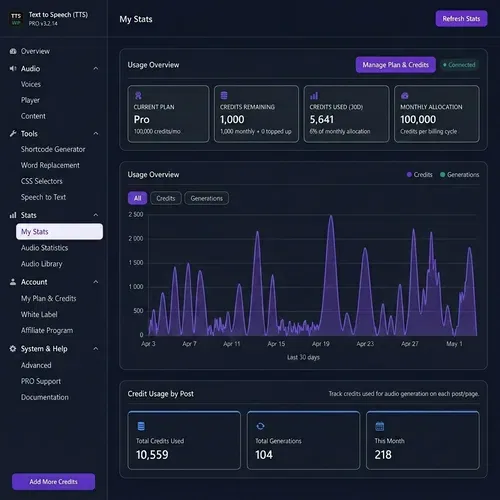
What features does TTSWP include?
TTSWP gives WordPress sites automatic audio on publish, a WCAG 2.1 AA accessible player, multilingual integration with WPML and Weglot, and zero impact on Core Web Vitals. Free starts with standard ElevenLabs voices in 30+ languages. Pro plans include 600+ voices in 90+ languages and add bulk generation up to 1,000 posts, voice cloning, S3 cloud storage with CloudFront, and Speech-to-Text. Agency plans add White Label rebranding.
AI voices and generation
Advanced AI voices powered by ElevenLabs
Pick from 600+ natural voices across 90+ languages. Switch the model per post, clone your own voice, or run audio for 1,000 posts in one click.
600+ natural voices
Standard voices ship on every plan. Pro adds Neural voices for premium-quality narration and Cloned voices for custom brand sounds.
Browse voice options →90+ languages
Generate audio in 90+ languages on Pro and 30+ on Free. On multilingual sites, the plugin auto-maps each translated post to a native voice.
See language mapping →Four ElevenLabs models
Flash v2.5 and Turbo v2.5 for fast generation. Multilingual v2 (Pro) for natural long-form. Eleven V4 (Pro), the newest and most expressive, for long-form narration in 90+ languages.
Compare models →Auto-generate on publish
Audio is created the moment you click Publish. No manual export, no copy-paste, no embed step. New posts ship with audio ready.
Read the workflow →Auto-generate on first visit
Let readers decide what gets narrated. A post is queued for audio once it has been read a few times, so the archive nobody opens never costs you a credit. You set the visit threshold and a daily credit cap.
How queuing works →Bulk generation up to 1,000 posts
Process up to 1,000 posts per batch (5,000 per day on Agency). Useful for backfilling archives or rolling out a new default voice.
How bulk works →Voice cloning
Use your own cloned ElevenLabs voice for a consistent brand sound across every audio file. Clone once, use everywhere.
Set up voice cloning →Player and accessibility
WCAG 2.1 AA accessible audio player
Keyboard navigation, ARIA labels, 4.5:1 color contrast. Helps your site meet WCAG, ADA, and the European Accessibility Act.
WCAG 2.1 AA built in
Keyboard accessible, visible focus indicators, no flashing content. Meets WCAG criteria 2.1.1, 2.4.7, 4.1.2, and supports ADA and EAA compliance.
Read the a11y report →Full ARIA labelling
Every control announces itself to screen readers with descriptive ARIA labels. Tested with VoiceOver, NVDA, and Narrator.
See WCAG checklist →Real-time color customization
Match the player to your theme. Background, text, and accent color pickers update the live preview without reloading the page.
Customize the player →Mobile responsive
Controls collapse below 480px and 320px to stay usable on every screen size. Touch-friendly seek and tap-to-expand.
Mobile behavior →Sticky footer player
Pin the player to the bottom of the page. Visitors keep listening while they scroll, with adjustable background opacity.
How it works →Waveform progress bar
A unique 60-bar inline SVG waveform per post. Zero JS overhead. Click and drag to seek through the audio.
See the waveform →Content control and multilingual
Built for your content workflow
Skip nav menus, exclude footnotes, route translated posts to native voices, and add pauses or emphasis with SSML.
CSS selectors
Tell the plugin which page elements to read or skip. Use a selector like .sidebar or #comments to exclude entire blocks from narration.
Configure selectors →Template and page builder content
Read text from Elementor Theme Builder, Divi, Bricks and block theme templates, plus ACF fields your theme shows on the page. Not only the post content.
Read the full page →Text preview before generating
See the exact text a post will read out, with a character and credit estimate, before you spend anything. Test unsaved selectors in seconds.
Preview your text →Long-article stitching
Long articles are split at sentence boundaries, generated in parts and joined into one seamless MP3, even on models with a short request limit.
See Pro plans →no-audio class
Add the no-audio class to any block to skip it during narration. Useful for code samples, boilerplate, or repeated CTAs.
Skip blocks easily →Truncate after
Cut narration at a marker. Stops audio before footnotes, references, or related-posts widgets that would clutter the listening experience.
Set a cut point →WPML, Polylang, Weglot, TranslatePress
Each translated post gets its own audio in the right voice. Auto language-to-voice mapping handles the routing for you.
Multilingual setup →GTranslate
Generate audio for every language GTranslate offers. When a visitor switches language, the player loads the matching audio automatically and hides where there is none.
GTranslate setup →Custom audio files
Upload your own recording, or paste a link, and use it instead of the generated voice for any post or page - per language on multilingual sites.
Add your own audio →SSML support
Use break, emphasis, say-as, and phoneme tags for fine pronunciation control. Spell out dates, numbers, and brand names exactly how you want.
SSML reference →Custom pauses
Add silence between paragraphs or before key phrases without writing SSML. Adjustable in milliseconds for natural pacing.
Add pauses →Performance and SEO
Zero performance impact and SEO upside
Lazy-loaded player, AudioObject schema for AI search, and global CDN delivery. Core Web Vitals stay green.
3 KB CSS, 15 KB JS gzipped
Tiny gzipped assets. Loaded only when the player is visible. Zero bytes hit the page until a visitor scrolls near the audio.
See full asset breakdown →Zero LCP, CLS, INP impact
The player lazy-loads. Placeholder matches final dimensions, so no layout shift. INP contribution stays under 5ms per interaction.
Core Web Vitals →AudioObject JSON-LD
Every post with audio gets schema for Google rich results and AI search engines like ChatGPT, Perplexity, and Google AI Overviews.
SEO benefits →20-40% higher session duration
Posts with audio see 20-40% higher average session duration on typical blog sites. That figure averages across all visitors. The ones who press Play stay 2-3x longer than readers who skim.
Dwell time data →TTSWP-managed S3 + CloudFront
Audio is hosted on our S3 bucket and served from CloudFront. No AWS account needed. Files load fast for visitors anywhere on the planet.
Cloud storage details →Self-hosted S3 bucket
Connect your own AWS bucket for full data residency control. Files store in your account and bill directly to your AWS plan.
Bring your own S3 →Ecosystem
Works with the tools you already use
WooCommerce, every major page builder, every major cache plugin. Plus White Label rebranding for agencies serving clients.
WooCommerce
Auto-narrates product descriptions, specifications, and reviews. Audio plays in the standard product template with no setup.
WooCommerce setup →Six page builders supported
Gutenberg, Elementor, Divi, WPBakery, Beaver Builder, and Oxygen. Use the global placement or drop the [tts_player] shortcode anywhere.
Builder-specific tips →Eight cache plugins tested
WP Rocket, LiteSpeed, W3 Total Cache, WP Super Cache, Cache Enabler, Hummingbird, Swift Performance, Autoptimize. Auto-configured exclusions.
Cache compatibility →Speech-to-Text
Upload audio and get a transcript back. Useful for podcast show notes, accessibility transcripts, or repurposing audio into blog posts.
How transcription works →Bring Your Own Key
Connect your own ElevenLabs API key. Skip TTSWP credits, billed directly by ElevenLabs at your own contract rate.
Connect your key →White Label
Replace plugin name, logo, author, and website. Hide affiliate and license menus. Control admin page visibility per user role.
Rebrand the plugin →Trusted by site owners worldwide
Downloaded 30,000+ times by site owners. Rated 5.0 out of 5 from 6 reviews on the official plugin directory.
"The setup was incredibly easy, even for someone without a technical background. Within minutes, I had high-quality audio versions of my posts ready to go."
"I had some issues, the plugin did not support my builder, but it got fixed really quick. Plugin works great, does exactly what it supposed to."
"OMG Thomas was amazing. Fixed my initial support question overnight. I suggested a few enhancements, and the very next day 95% of them were implemented. You CANNOT get better support than that."
Frequently asked
Questions about TTSWP features
Real answers about pricing tiers, performance, multilingual support, and how the plugin behaves on your site.
What features come with the free TTSWP plugin?
Does TTSWP work on multilingual sites?
How fast is bulk audio generation?
Is the audio player WCAG compliant?
Where is my generated audio stored?
Does TTSWP work with my page builder?
Can I use my own cloned ElevenLabs voice?
How much does TTSWP slow down my site?
What is the difference between free and Pro features?
Free for life. Pro when you need it.
Pick the plan that matches your site
The free plan covers Standard voices, automatic generation, the WCAG player, and every page builder. Upgrade when you need premium voices, bulk generation, S3 storage, or White Label.
Add audio to your site in five minutes
Install free from WordPress.org. Generate your first audio with the included credits. No credit card needed.
Free plan includes 10,000 starter credits