Text to Speech for Weglot WordPress Sites: What Works
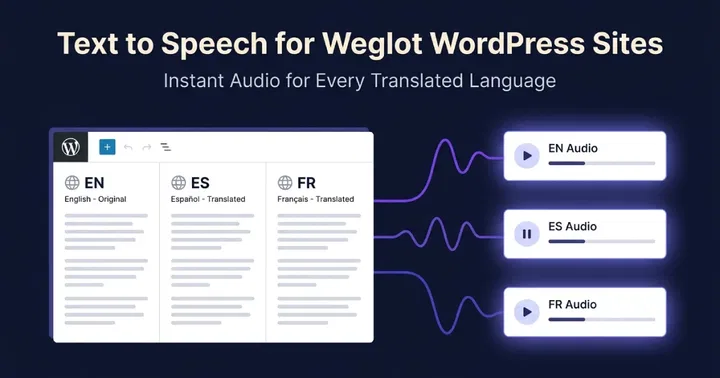
Most text-to-speech plugins claim Weglot compatibility, but few handle it correctly in practice. The difference comes down to how each plugin reads your content. Plugins that pull text from the WordPress database miss the translated version Weglot serves to visitors. Plugins that detect the active Weglot language and read from the rendered page produce audio that matches what the visitor sees.
This post explains the technical reason, lists what real Weglot support requires, and walks through how each major TTS plugin handles it.
Why Weglot breaks most TTS plugins
Weglot works differently from WPML and Polylang. Those plugins create separate post records for each language. A Spanish translation lives as its own row in the WordPress database, with its own post ID, slug, and content.
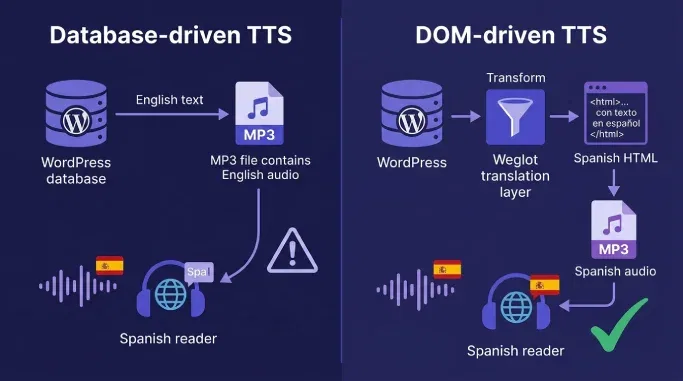
Weglot does not do this. Weglot translates pages on the fly. The original English content stays in the database. When a visitor switches to Spanish, Weglot intercepts the HTML response and rewrites the visible text before it reaches the browser. The database never changes.
This matters for text-to-speech. A typical TTS plugin runs on a hook like save_post or the_content. It reads $post->post_content, sends that text to a voice provider, and saves an MP3 file. That MP3 plays no matter which language the visitor is viewing.
The result: a Spanish-speaking visitor sees Spanish text and hears English audio. The player loads. The voice plays. But the language mismatch breaks the experience and undermines the accessibility benefit you installed the plugin for.
A Weglot-aware TTS plugin has to do three extra things. It must detect the visitor's current Weglot language at request time. It must generate audio from the translated text, not from the database content. And it must cache the audio per language, so the next visitor in Spanish does not trigger another paid generation.
What real Weglot support requires
Use this five-point checklist to evaluate any TTS plugin you are considering.
- The plugin detects the visitor's active Weglot language from the URL or Weglot API.
- The plugin generates audio from the translated content, not from the raw database value.
- The plugin caches the audio file per language, so each language is generated once.
- The plugin lets you assign a specific voice per language, so French content gets a French voice.
- The plugin supports bulk pre-generation across all enabled Weglot languages, so visitors never wait for first-time synthesis.
Most plugins meet one or two of these. Few meet all five.
How the major Text to Speech plugins handle Weglot
We checked the public documentation, WordPress.org listings, and plugin descriptions for each plugin below. Some publishers may have undocumented Weglot handling. If it is not documented, you cannot rely on it.
| Plugin | Detects Weglot language | Reads translated DOM | Per-language cache | Voice per language | Bulk per language |
|---|---|---|---|---|---|
| TTSWP | Yes | Yes | Yes | Yes | Yes (Pro and Agency) |
| BeyondWords | Not documented (multilingual is manual: secondary languages added in plugin settings, language selected per post) | No (sends post content to BeyondWords API from the WordPress database, not from the rendered page) | Audio is stored per post and per chosen language, but only when the language is set manually on each post | Yes (primary voice plus secondary languages and voices selected per post) | Bulk Generate Audio exists, but only for the language set on each post. No automatic per-Weglot-language bulk run |
| Trinity Audio | Not documented | The player reads the rendered article when it loads, but real-time translation is limited to 6 languages and is a separate feature | Audio is generated server-side per post in the language set for that post. No documented per-Weglot-language cache | Yes, but per post (manual language selection at post level) | Not documented |
| GSpeech | Not documented. Multilingual Mode officially supports GTranslate, WPML, Polylang and TranslatePress. Weglot is not listed | Yes (reads DOM at click time) | Not documented for Weglot | Yes for the listed multilingual plugins (auto voice selection based on active site language). Weglot behavior not documented | Not documented |
| ResponsiveVoice | Yes (reads DOM at click) | Yes (browser Web Speech API) | N/A (no audio file stored) | Yes (language and voice parameters available in shortcodes and settings, mapped to Web Speech API voices) | N/A (no pre-generation) |
| Voicer | Not documented. WPML is the only multilingual integration listed in the plugin description | Yes (reads selected text from the DOM and sends it to Google Cloud TTS at click time) | N/A for real-time playback. Voice per element can be set via CSS class such as voicer-voice-en-GB-Wavenet-A | Yes, but configured manually via CSS class per element, not auto-mapped to Weglot language | N/A (no pre-generation) |
TTSWP
TTSWP detects the active Weglot language at request time and generates audio from the rendered translation. Each language gets its own cached MP3 file. The plugin includes a Language Voice Mapping screen where you assign a separate voice to each Weglot language. Bulk Generation on Pro and Agency plans pre-renders audio in every enabled language. The full integration is documented at the Weglot integration page.
BeyondWords
BeyondWords focuses on neural voices and audio CMS features for newsrooms and large publishers. The public documentation does not describe Weglot-specific handling. The plugin generates audio at publish time from the stored post content, which means Weglot translations would not be picked up automatically. BeyondWords is a strong choice for monolingual publishers. Weglot users should test carefully before committing.
Trinity Audio
Trinity Audio is a SaaS platform with a WordPress connector. The player loads as JavaScript and reads the article text from the DOM when it initializes, then sends it to Trinity's servers for audio generation. The public documentation does not describe Weglot-specific language detection or voice-per-language mapping. The free plan covers up to 5 articles per month, with access to 125+ languages and 600+ voices.
GSpeech
GSpeech uses Google Cloud Text-to-Speech and adds a listen button to your posts. The public documentation does not mention Weglot. The plugin reads visible page content at click time, which means it may produce translated audio if the visitor has already switched language. Voice-per-language mapping is not documented.
ResponsiveVoice
ResponsiveVoice runs entirely in the browser using the Web Speech API. Because it reads text from the rendered DOM at the moment the visitor clicks play, it does follow Weglot translations automatically. Voice quality is lower than cloud-based providers, and commercial use requires a paid plan. The plugin was last updated on 14 April 2025 (version 1.7.15), so it has not been actively maintained for over a year.
Voicer
Voicer uses Google Cloud voices and markets WPML support. Weglot is not mentioned in the public documentation. The plugin generates audio at publish time from the database, which means a database-level translation system like WPML is required for multilingual audio to work.
The pattern is clear. Plugins that generate audio at publish time from the database need a database-level translation system like WPML. Plugins that generate audio at request time from the DOM can work with Weglot. TTSWP is built around the second model, with named voice-per-language mapping and per-language caching.
How to test Weglot and TTS together in five minutes
Run this test on any TTS plugin you are considering. You need a staging site with Weglot active and at least one destination language enabled.
- Install the TTS plugin and activate it.
- Open a post in your default language. Confirm the audio player appears and plays correctly.
- Use the Weglot language switcher to change to a destination language. Do not refresh.
- Click play on the audio player.
- Listen for ten seconds.
Three outcomes tell you what the plugin does.
The audio plays in the original source language. The plugin is reading from the database, not from the translated DOM. Weglot is not really supported.
The audio plays in the destination language, but with the wrong voice or a generic robotic voice. The plugin detects the language but has no voice-per-language mapping. Acceptable for accessibility-only use cases, not for brand quality.
The audio plays in the destination language with a natural voice that matches the language. The plugin handles Weglot correctly. Check the audio library after the test to confirm the file was cached, not regenerated on each play.
Repeat the test with a second destination language to confirm caching works across multiple languages.
Which plugin fits which case
The right choice depends on your priorities and budget.
You already use Weglot and want professional audio in every language. TTSWP was the only plugin we tested that documents and ships all five Weglot-handling requirements. Voice-per-language mapping, per-language caching, and bulk generation are included. Start with the free plan.
You publish monolingual content and need enterprise audio features. BeyondWords offers a stronger audio CMS, podcast distribution, and voice cloning. If you do not use Weglot, the lack of Weglot-specific handling does not matter.
You want zero cost and accept basic browser voices. ResponsiveVoice reads from the DOM and works with Weglot automatically, with reduced voice quality and licensing limits.
You already use WPML, not Weglot. Most plugins work, because WPML stores translations in the database. TTSWP handles WPML through a dedicated WPML integration.
You are choosing both translation and TTS at the same time. If audio quality and language coverage matter, pick TTSWP plus Weglot. If you need translator-driven editorial control over each translation, pick WPML and any TTS plugin that supports WPML.
Frequently asked questions
Does Weglot translate the audio file automatically?
No. Weglot translates HTML, JSON, and a few other text formats. It does not translate MP3 files. A TTS plugin has to generate a new audio file in each language from the translated text. TTSWP does this on first request, then caches the result so the same audio serves on every later visit in that language.
Can I use ElevenLabs voices with Weglot?
Yes. TTSWP uses ElevenLabs voices by default. You can assign a different ElevenLabs voice to each Weglot language in the Language Voice Mapping screen. ElevenLabs supports a wide range of languages, so most Weglot language pairs are covered with a native-sounding voice.
Will audio regenerate every time Weglot updates a translation?
No. Audio is cached per language and per post. If you edit the source post, TTSWP can regenerate the audio. If Weglot updates a translation in its dashboard, the existing audio stays cached. Click Regenerate in the post list, or use Bulk Generate, to force a refresh when you know a translation has changed.
Does this work with Weglot subdirectories and subdomains?
Yes. TTSWP reads the active language from Weglot, not from the URL structure. Both subdirectory setups (example.com/es/) and subdomain setups (es.example.com) work the same way. The plugin asks Weglot which language is active for the current request and generates or serves the matching audio file.
How much does multilingual audio cost?
Each language you support uses credits the first time audio is generated in that language for each post. A 1,000-character post in five languages uses around 5,000 credits on first play across all languages. After that, the cached file serves with no further cost. See the credits documentation for the full breakdown.
Next step
Try TTSWP on your Weglot site. Install the free version from WordPress.org, activate the Weglot integration in the Overview dashboard, and map a voice to each language. The free plan covers enough characters to test two or three short posts across two languages. If you run into anything, the Weglot integration docs cover every edge case we have seen in production.