Text to Speech for Polylang Sites: What Actually Works
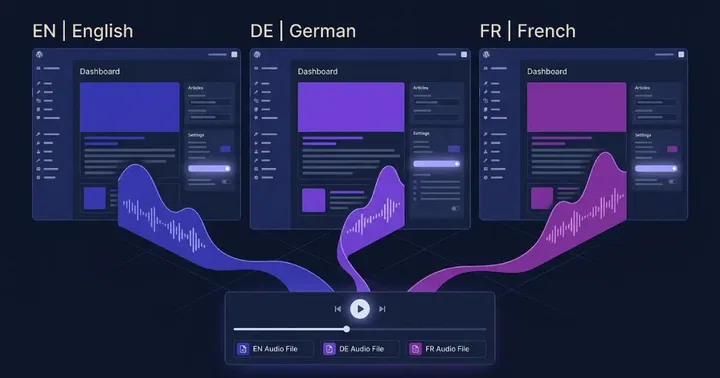
Real Polylang text to speech means one audio file per translated post, in the correct language and voice. Because Polylang stores every translation as its own WordPress post with its own ID, per-post audio generation works natively. The traps are voice selection, cookie redirects, and page caching, not the audio itself.
This is the fourth post in our multilingual TTS series. We covered WPML, Weglot, and the GTranslate 3.3.0 release. Polylang sits closest to WPML in architecture but has its own quirks. Here is what we tested and what actually works on production sites with Text to Speech - TTSWP.
Why Polylang matters for text to speech
Polylang runs more multilingual WordPress sites than any other free plugin. It has more than 800,000 active installations and the largest free install base of any general-purpose multilingual plugin. The first version shipped in 2011, and the plugin is still actively maintained. There is no limit on the number of languages you can add, and WordPress language packs download automatically. Most Polylang sites are blogs, small publishers, and budget-conscious agencies that picked it because the core is free and the architecture is clean.
That popularity is the problem for TTS plugins. Many claim Polylang support but only test the default language. They attach a single audio file to a post, then serve the same file on every translation. The Spanish version plays English audio. The German version stays silent. Visitors leave.
The fix is structural. Polylang adds no extra database tables and no shortcodes. It builds on WordPress taxonomies, the same core feature that powers categories and tags. Each translation lives as a real post. So per-post audio generation, which is how TTSWP works, lines up with how Polylang stores content.
How Polylang differs from Weglot and GTranslate
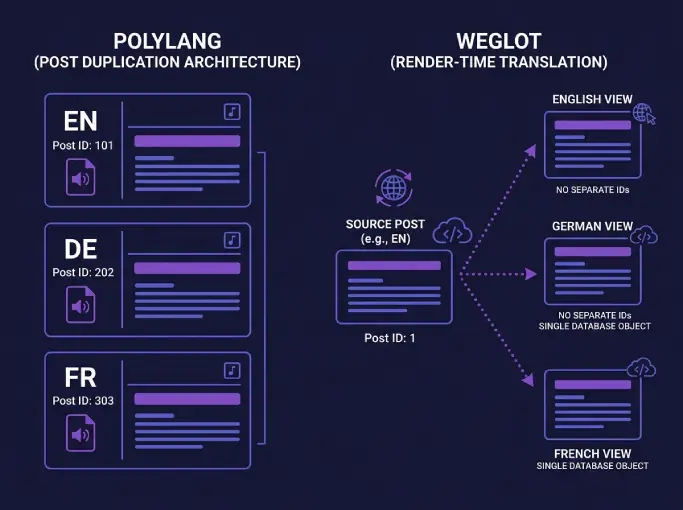
Polylang duplicates posts. Weglot and GTranslate translate at render time. That single difference decides everything about TTS support.
On a Polylang site, the German translation of "About us" is a separate WordPress post with post ID 412, language slug "de", and its own content in the database. WordPress sees it, the REST API sees it, and any TTS plugin that hooks into save_post or wp_insert_post sees it. Audio generation runs once per translation, in the language of that translation, and the file is cached against that post ID.
Weglot and GTranslate work differently. The translated text only exists when a user requests the page. There is no second post to attach audio to. We covered the workarounds for Weglot and GTranslate in earlier posts. WPML uses the same duplication model as Polylang, which is why our WPML guide applies here with small adjustments.
For TTS this is good news. Polylang gives you exactly what you need: a stable post ID per language, a known language slug, and a permalink that does not change at render time.
The four Polylang URL structures and what each means for TTS
Polylang offers four URL modes. Each changes how caches, CDNs, and language-detection code see your pages. Pick the wrong one and the right audio file ends up behind the wrong URL.
1. Language from content only (no language code in URL)
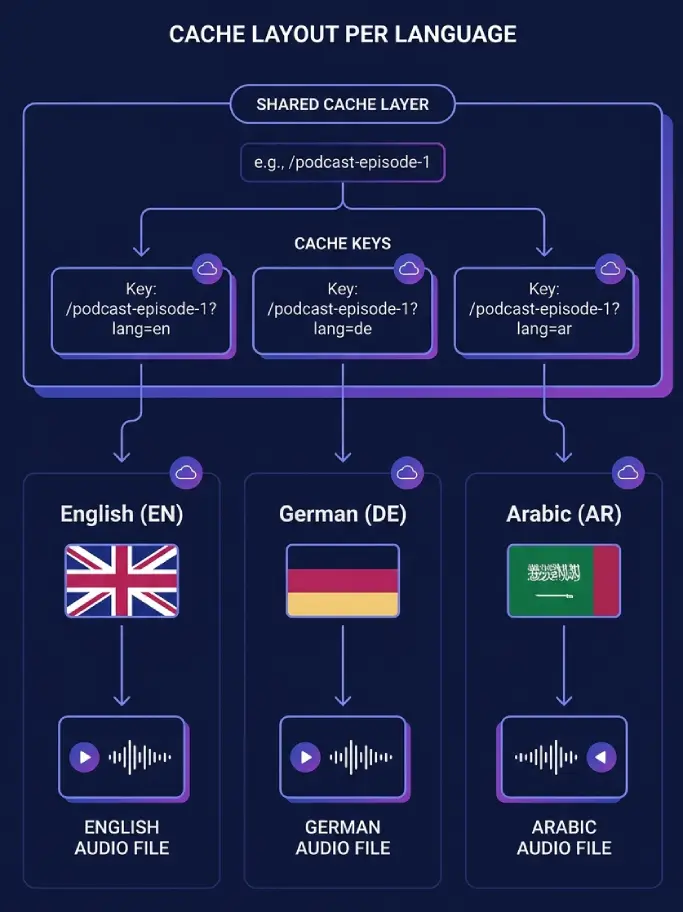
This is the hardest case. The URL example.com/about serves English to one visitor and German to another, based on cookie or browser detection. Page caches see one URL and store one variant. Whichever language the cache grabbed first wins.
For TTS the audio file itself is fine because it is keyed to the post ID, not the URL. The problem is the page that embeds the player. If the cached English page loads with the German audio embed, the player still plays German, but visitors expected English text. We do not recommend this URL mode on any cached site.
2. Directory URLs (/en/, /de/)
This is the default and the setup we recommend. Each language lives at its own path. Caches treat /en/about and /de/about as distinct keys. The right page loads with the right player and the right audio file. No cookie tricks needed.
Watch the "hide URL language information for default language" option. When enabled, the default language drops the prefix. /about becomes English and /de/about stays German. URL-based language detection in third-party code then fails on the default-language paths because it sees no slug. If you use this option, lean on pll_current_language() rather than URL parsing.
3. Subdomain (en.example.com, de.example.com)
Subdomains give each language its own host and its own cache namespace. TTS players load cleanly per language. The cost is DNS, SSL certificates per subdomain, and slightly more complex analytics. Works well at scale.
4. Separate domains per language
Full separation. example.com for English, example.de for German. TTS still keys audio to the post ID inside each WordPress install, and the player works the same way. This mode is common for brands that already own ccTLDs.
The cookie redirect problem
Polylang can detect a visitor's browser language on the first visit to your homepage. It then sets the pll_language cookie and redirects the visitor to the matching language version. Combined with page caching, this is where wrong-language audio appears.
Here is the failure sequence we have reproduced. A French visitor lands on the homepage. Polylang detects French, sets the pll_language cookie, and redirects to /fr/. The cache stores that redirect response under the homepage URL. The next visitor, an English speaker, requests the homepage and gets the cached redirect to /fr/. They land on the French page, hear French audio, and bounce.
With directory URLs the damage stays on the homepage, because every other page has a distinct cache key per language. With the "language from content" mode the same problem spreads to every URL on the site.
Three fixes work. The simplest is to turn off browser language detection on any cached site and let visitors choose via the language switcher. The second is to tell your cache plugin to vary on or bypass the pll_language cookie. The third is to exclude the homepage from the page cache so the detection redirect always runs live.
If you run WP Rocket, W3 Total Cache, or LiteSpeed, see our caching integration docs for the cookie configuration. Polylang works alongside these cache plugins, but coexisting is not the same as being language-aware. You still configure the cache yourself.
AJAX behaviour on the frontend
Polylang auto-detects the current language on frontend AJAX requests and loads strings for that language. You can also pass an explicit lang variable in the request to force a specific language. For TTS, this matters when the audio player or related-posts widget fires an AJAX call to fetch a different post.
In our testing, Polylang handles this cleanly. We did not see the AJAX-language regressions we documented in the WPML post. If a custom integration needs to fetch a post in a non-current language, pass lang explicitly and check that function_exists('pll_current_language') before reading the result.
Setting up Text to Speech - TTSWP on a Polylang site
These steps assume Polylang is already installed and at least one translation exists.
- Install Text to Speech - TTSWP from the WordPress.org plugin page. Activate it. See the install docs if you hit a permission error.
- Connect the plugin to TTSWP by following the connection guide. The free plan includes welcome credits so you can test before deciding on a paid tier.
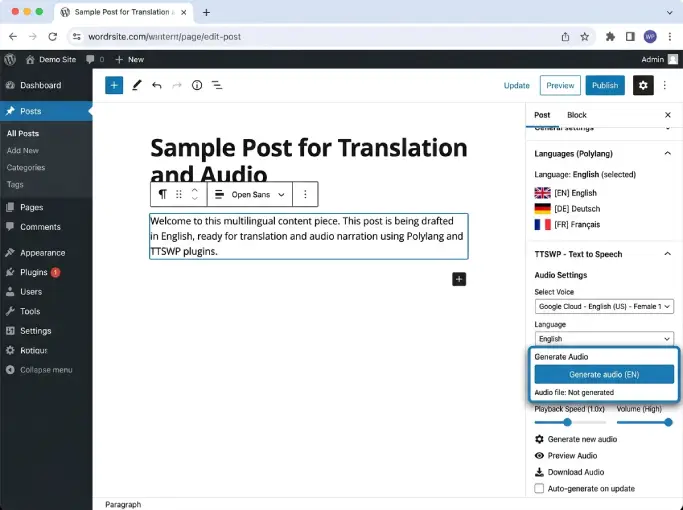
- Open the original-language post and generate audio. Confirm the player appears on the front end.
- Switch to the translated version from the Polylang language switcher in the post editor. Generate audio again. Polylang has loaded a different post ID, so TTSWP treats this as a new generation and stores a separate file.
- Pick the voice for each translation. Voice selection happens at the post level. See the voice selection docs for the per-post override.
- Verify on the front end. Open
/en/post-slugand/de/post-slugin different tabs. Play each. The voices and languages should match.
Today, per-language default voice mapping in TTSWP covers WPML and Weglot first. On Polylang, voice selection lives at the post level and the per-language default works through the post-language pickup we describe below. For most Polylang sites this is enough, because each translation is a real post and the voice is set once per post. See the Polylang integration docs for the current behaviour.
How voice selection should pull the post language
The correct API for reading a post's language in Polylang is pll_get_post_language(). Always check that the function exists before calling it, as Polylang's own developer guidance recommends. The pattern looks like this:
if ( function_exists( 'pll_get_post_language' ) ) {
    $lang = pll_get_post_language( $post_id, 'slug' );
    // $lang is now 'en', 'de', 'fr', etc.
}
For frontend context, pll_current_language() returns the current request language. Both functions are stable and have been part of the Polylang public API for years. Voice mapping logic should always read from the post language, never from the site default, otherwise translations inherit the wrong voice.
Polylang free versus Polylang Pro for TTS
Nothing in Polylang Pro is required for audio. The free version of Polylang gives you everything TTSWP needs: per-post duplication, language slugs, and the public API functions above.
Polylang Pro adds DeepL machine translation, REST API support, translated URL slugs, and XLIFF export for outsourced translation work. None of these change the TTS picture for blog posts and pages. Polylang for WooCommerce is a separate paid add-on that manages shop pages, product categories, attributes, and transactional emails. If you want narration on product descriptions, see our WooCommerce TTS guide.
SEO and AEO with audio per language
Polylang handles hreflang automatically, which is most of the SEO work for multilingual sites. Add AudioObject schema per language version, point each one at the file for that specific translation, and you give search engines a clean signal.
In our own testing, articles with audio and AudioObject schema get cited more often by AI search engines. We documented the method and the results in our AEO and audio post. The short version: one audio file per translation, schema per translation, and the AEO benefit follows.
Common problems and fixes
| Symptom | Likely cause | Fix |
|---|---|---|
| Translation plays in the wrong voice | Voice set globally, not per post | Open the translated post, set voice on that post, regenerate |
| One language has no audio | Audio never generated on that translation | Open the translated post in the editor, click generate |
| Cached page shows wrong-language player | Cache storing the detection redirect or a single page variant | Turn off browser language detection, or vary the cache on the pll_language cookie |
| Arabic or Hebrew player layout looks off | RTL CSS not applied to the player | Add RTL overrides via custom CSS |
| Player UI strings stay in default language | Plugin strings not registered for translation | Register player strings with pll_register_string so Polylang exposes them in the strings translation screen |
| Audio generates in default language for all posts | Voice mapping reading site locale instead of post language | Confirm post language via pll_get_post_language($post_id, 'slug') |
Accessibility note
Adding narration per language is also an accessibility win. Visitors who read better in their native language but prefer to listen now get both. If your site falls under WCAG 2.2 or the European Accessibility Act, see our WCAG audio compliance guide for the criteria that apply. For a broader walkthrough of adding TTS to WordPress in 2026, the main tutorial covers the fundamentals.
Frequently asked questions
Does Polylang work with text to speech?
Yes. Polylang stores each translation as a separate WordPress post with its own ID, which is the same architecture TTSWP uses for per-post audio. Generate audio on each translation and you get one file per language with the voice you picked. The free version of Polylang is enough. No special configuration is required beyond the standard TTSWP setup.
Do I need Polylang Pro for audio?
No. The free version of Polylang exposes everything TTSWP needs: per-language post duplication, language slugs, and the public API functions pll_get_post_language() and pll_current_language(). Polylang Pro adds DeepL machine translation, REST API support, and translated URL slugs. None of those change how audio generation or playback works.
Can each language have its own voice?
Yes. Because each translation is a separate post, voice selection happens at the post level. Pick a German voice on the German translation, a Spanish voice on the Spanish translation, and so on. TTSWP saves the choice per post and uses it every time you regenerate. See the language and voice mapping docs for the current behaviour.
Why does my audio play in the wrong language?
The usual cause is page caching combined with Polylang's browser language detection. The cache stores the homepage redirect or a single language variant and serves it to everyone. The audio file itself is correct for the post ID. The page that loads it is not. Turn off browser detection on cached sites, or tell your cache plugin to vary on the pll_language cookie. Directory URLs (/en/, /de/) limit the damage to the homepage because every other page has a distinct cache key.
How does Polylang differ from WPML for TTS?
Both duplicate posts per language, so per-post audio works the same way on both. The differences are in the AJAX handling, the cookie behaviour, and the developer API names. Polylang uses pll_ prefixed functions and is generally lighter. WPML has more built-in WooCommerce features but a larger plugin footprint. Our WPML post covers that side.
Can I translate the audio player labels?
Yes, with one extra step. Polylang exposes a strings-translation screen for plugins that register their UI strings using pll_register_string(). If you want the play button, progress timer label, or any other player text to switch with the language, register those strings in your child theme or a small site-specific plugin. They then appear in Languages, Strings translations.
What to do next
Open one of your translated posts in the WordPress editor and look at the audio panel. If it shows the right language by default, you are done with the setup. If not, set the voice on that translation, regenerate, and check the front end. Once one translation works, the rest follow the same pattern.
If you have not installed Text to Speech - TTSWP yet, grab it from WordPress.org and connect it to your free TTSWP account. Test on one translation, listen, and decide whether to roll out across the rest.