Best Text-to-Speech Plugins for WordPress (2026)
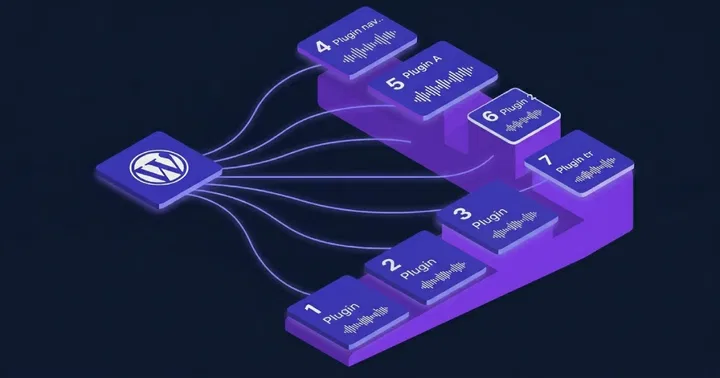
If you searched for a WordPress text-to-speech plugin, you found a dozen guides that rank by download count and little else. Download count does not tell you whether the audio gets cited by AI search, whether the player meets accessibility law, or whether it drags your site speed down. Those three things decide value in 2026. We ranked seven plugins on them, tested or source-checked in May 2026. The verdict table sits at the top for anyone who only needs the short answer.
Three shifts changed the ranking this year. AI answer engines now cite audio content when it ships with AudioObject schema, which lifts plugins that publish structured data over those that do not. The European Accessibility Act applies from June 2025, so private sites in scope need a WCAG 2.1 AA player, not just a play button. Core Web Vitals still grade every page, so a heavy player that blocks rendering is no longer acceptable. We weighted each plugin against these three pressures.
Quick verdict
Here is the short answer in table form. Each plugin gets a single best-fit case and a one-line summary of voice engine, schema support, and pricing model.
| Plugin | Best for | Voice engine | AEO schema | Pricing model |
|---|---|---|---|---|
| TTSWP | Most WordPress sites that want AI voices, WCAG, and AI search visibility | ElevenLabs (600+ voices, 70+ languages) | AudioObject JSON-LD on every plan, free included | Free, BYOK $29/yr, Pro, Agency. No overage fees. |
| BeyondWords | Newsrooms and publishers with monetization | Google Cloud, AWS, and Microsoft Azure neural voices, plus a BeyondWords NLP/SSML layer and voice cloning. 500+ voices across 140+ language locales. | None. Confirmed by inspecting the plugin source. | Free Pilot tier (10,000 one-time characters), then tiered publisher plans |
| GSpeech | Simple sites wanting Google Cloud voices without API keys | Google Cloud TTS and OpenAI | Not documented | Free download, subscription for premium AI |
| AtlasVoice | Sites wanting a real free browser tier | Browser Web Speech API free, plus Google, OpenAI, ElevenLabs on the paid tier | Vendor-claimed audio schema on paid tier | Free browser tier, paid AI tier |
| Amazon Polly (AWS for WP) | Developers comfortable with AWS | Amazon Polly (100+ voices, 40+ languages) | None built in | Pay AWS directly |
| ResponsiveVoice | Basic listen button on small sites | Browser voices with cloud fallback (51 languages, 168 voices) | None | Free, unlimited. Paid API key for full voice range. |
| Reinvent WP Text to Speech | Sites wanting word highlighting during playback | ElevenLabs | None | Free 20,000 characters/month, then subscription |
What actually matters in a WordPress TTS plugin in 2026
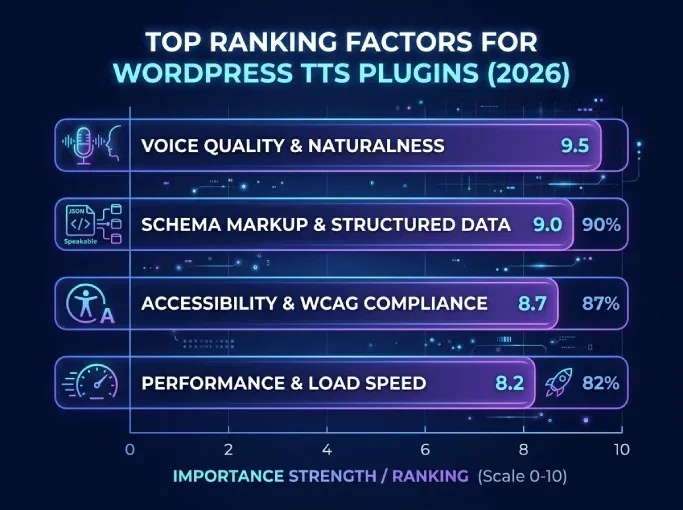
Four factors decide whether a plugin earns its place this year. We tested each one against real WordPress sites running WooCommerce, multilingual setups, and high-traffic blogs.
Voice quality. Generative engines like ElevenLabs v3 produce prosody close to a human reader. Concatenative browser voices still sound robotic and trigger bounce. If your readers are paying attention to your content, the voice has to match the writing quality. This is the single largest factor in completion rate.
Structured data for AI search. AI engines like Perplexity, ChatGPT Search, and Google AI Overviews pick audio content when the page exposes AudioObject JSON-LD. Most TTS plugins still ship without it. We covered the mechanics in our piece on how AI search engines use audio content.
Accessibility. A player that plays sound is not the same as an accessible player. WCAG 2.1 AA requires keyboard control, visible focus, sufficient contrast, ARIA labels, and predictable behavior. The European Accessibility Act now enforces this on many private sites. See WCAG audio requirements for WordPress and the EAA guide for WordPress.
Performance. The player has to lazy-load and stay out of LCP, CLS, and INP. We measured plugins that added 100 KB or more of blocking JavaScript and watched Core Web Vitals drop. A good 2026 player ships under 20 KB and defers until interaction.
1. TTSWP: best overall for AI voices, accessibility, and AI search
Best for: WordPress sites that want ElevenLabs voices, a WCAG-ready player, and structured data that AI engines can cite.
TTSWP uses ElevenLabs as its voice engine. On paid plans you get 600+ voices across 70+ languages, including the v3 model with emotional prosody. The free plan ships Standard voices in 30+ languages and 10,000 one-time welcome credits, which is enough for roughly two long articles. Audio generates automatically on publish, and the player is WCAG 2.1 AA out of the install.
Install TTSWP free from WordPress.org
Where TTSWP separates from the pack is structured data. Every plan, including the free one, outputs AudioObject JSON-LD on every post. That is what makes the audio eligible for citation in Perplexity, ChatGPT Search, and Google AI Overviews. No competitor in this list documents this on the free tier. The plugin also adds Article schema automatically.
Integration coverage is broad. WPML, Polylang, Weglot, and TranslatePress all work with automatic language and voice mapping. Six page builders are supported. WooCommerce product narration ships on Pro, along with bulk generation up to 1,000 posts, SSML, voice cloning, Speech-to-Text, S3 and CloudFront storage, sticky footer player, and waveform. Agency adds white label, shared credit pool, multi-site dashboard, and bulk up to 5,000 per day.
Performance is the quiet win. The frontend ships 3 KB of CSS and 15 KB of JavaScript gzipped, lazy-loaded, with no LCP, CLS, or INP impact. We confirmed this on a clean WordPress install with Lighthouse. Credits equal characters. A 1,000-word article uses about 5,500 credits.
Pricing is transparent. BYOK Pro is $29 per year with your own ElevenLabs key and local storage. Pro and Agency are hosted with bundled credits. No overage fees. Payments run through Stripe.
Honest weakness: TTSWP is cloud-based. You need credits, or you bring your own ElevenLabs key. There is no unlimited free browser-voice generation. If your goal is a zero-cost listen button using the browser engine, look at AtlasVoice or ResponsiveVoice instead.
WordPress.org install count is around 15,000 with a 5.0 rating on a small number of reviews. The product is run by Norse Digital Group LLC.
2. BeyondWords: best for newsrooms and audio publishers
Best for: News publishers and editorial teams that need analytics, monetization, and a full audio publishing platform behind WordPress.
BeyondWords is an audio publishing platform with a WordPress plugin as the front door. It draws neural voices from Google Cloud, AWS, and Microsoft Azure, with 500+ voices across 140+ language locales, plus its own NLP and SSML layer and voice cloning. The platform adds an editorial dashboard, listener analytics, and audio ad insertion. It fits teams that treat audio as a separate channel with its own metrics and revenue line.
On pricing, BeyondWords has a free Pilot tier with 10,000 one-time characters that do not renew. Paid publisher tiers sit above it. Public third-party price figures vary widely and are often outdated, so confirm current numbers on beyondwords.io/pricing before quoting them.
Honest weakness: Setup is heavier than a plugin-only solution. You need a BeyondWords platform account, and your audio lives inside that platform. The plugin also outputs no AudioObject schema. We confirmed this by reading the plugin source, where the only frontend head output is proprietary beyondwords-* meta tags for its own player, not structured data for search engines. That is fine for newsrooms with a dedicated audio editor. For a solo blog or a small WooCommerce store, the overhead is hard to justify.
3. GSpeech: best for simple Google Cloud setups without API keys
Best for: Sites that want Google Cloud or OpenAI voices, multiple player styles, and no API key management.
GSpeech has been around since 2012, which is unusual stability in this category. It uses Google Cloud and OpenAI voices, offers 230+ voices, and supports several player types. The selling point is that you do not handle API keys. A free version ships with browser and cloud voices, and a subscription adds premium AI voices. GSpeech narrates posts, pages, and WooCommerce product descriptions.
Honest weakness: Single-provider voice quality has limits. Google neural voices are good, but they sit a tier below generative engines like ElevenLabs v3 on prosody. GSpeech does not document AudioObject schema output, so AI search visibility is unclear and likely weaker than plugins that ship full markup.
4. AtlasVoice (Text to Audio): best for a genuine free browser tier
Best for: Sites that want a working free listen button with optional upgrade to AI voices.
AtlasVoice gives you browser Web Speech API voices for free, with 20 to 300+ voices depending on the browser. The paid tier adds the AtlasVoice AI engine in 63 languages, plus Google, OpenAI, and ElevenLabs voices. The free tier is real and unlimited, which is rare. It has a high install count on WordPress.org. It supports WooCommerce through custom post types and works with WPML, Polylang, GTranslate, and TranslatePress. The vendor claims audio schema on the paid tier.
Honest weakness: Browser voices vary between Chrome, Safari, and Firefox. The same article sounds different to different readers. Some browsers ship better voices than others, and mobile coverage is uneven. For a consistent listening experience across devices you need the paid AI tier, which puts AtlasVoice in the same price band as cloud-only competitors. AtlasVoice states accessibility support but does not publish a formal WCAG conformance report.
5. Amazon Polly (AWS for WordPress): best for developers
Best for: Developers who already use AWS and want direct Polly control.
Polly voices are solid, with 100+ voices across 40+ languages and four engines, including a generative engine expanded in March 2026. The AWS plugin gives you direct access without a third-party reseller. You pay AWS directly at standard Polly rates, which can be cheaper at scale. New AWS accounts get a 12-month free usage allowance, separate from any plugin.
Honest weakness: You need an AWS account, IAM credentials, and S3 setup. The plugin assumes technical comfort. There is no built-in AudioObject schema, so AI search citation needs custom work. For a non-technical site owner, the activation step alone is a wall.
6. ResponsiveVoice: best for a basic shortcode listen button
Best for: Small sites that want a simple play button using shortcodes.
ResponsiveVoice is an old HTML5 library. It supports 51 languages through 168 voices, with browser voices by default and cloud voices once you add a free API key. It works through shortcodes and is light. If you just need a single button on a few pages, it does the job.
Honest weakness: No schema, no automatic generation on publish, and no documented WCAG 2.1 AA player. The plugin self-claims WCAG 2.0 and ADA support, but publishes no formal conformance report, and recent reviews flag maintenance and server errors. The voices sound dated next to generative engines. For accessibility-driven sites or anything aiming at AI search, this is not the right pick in 2026.
7. Reinvent WP Text to Speech: best for word highlighting
Best for: Sites that want synchronized word highlighting during playback.
Reinvent integrates with ElevenLabs and adds word and sentence highlighting as the audio plays. It includes a free cloud tier of 20,000 characters per month, then moves to a subscription. The plugin is lightweight, around 1 MB on first load, and the highlighting effect is useful for learners and accessibility users who follow along visually.
Honest weakness: No schema output, so the audio is invisible to AI engines. It publishes no formal WCAG conformance report and no documented Core Web Vitals data. Integration coverage is narrower than TTSWP or BeyondWords. The highlighting feature is the main reason to choose it.
Full feature comparison
This is the table to bookmark. Each row is a feature, each column a plugin. "Not documented" means no public source or vendor page confirms the capability, so do not assume it either way.
| Feature | TTSWP | BeyondWords | GSpeech | AtlasVoice | Amazon Polly | ResponsiveVoice | Reinvent |
|---|---|---|---|---|---|---|---|
| Voice engine | ElevenLabs | Google Cloud, AWS, Azure + NLP/SSML layer | Google Cloud, OpenAI | Browser + Google, OpenAI, ElevenLabs | Amazon Polly (4 engines) | Browser + cloud fallback | ElevenLabs |
| Number of voices | 600+ (Pro), Standard set (Free) | 500+ | 230+ | 20-300+ browser, plus AI providers on Pro | 100+ | 168 | ElevenLabs catalog |
| Languages | 70+ (paid), 30+ (free) | 140+ locales | 65+ | Browser-dependent (free), 63 on AtlasVoice AI | 40+ | 51 | ElevenLabs languages |
| AudioObject JSON-LD | Yes, all plans including free | No (confirmed in source) | Not documented | Vendor-claimed on paid tier | No | No | No |
| WCAG 2.1 AA player | Yes, default | Not documented | Not documented | Claims accessibility, no report | Not applicable (API only) | Claims WCAG 2.0, no report | Not documented |
| Multilingual auto voice mapping | WPML, Polylang, Weglot, TranslatePress | Platform-side | Own translation, 70+ languages | WPML, Polylang, GTranslate, TranslatePress | Manual | No | Per language, no documented WPML mapping |
| WooCommerce narration | Yes, Pro | Not documented | Yes, product descriptions | Yes, via custom post types | Custom | Shortcode only | Not documented |
| Bulk generation | Up to 1,000 (Pro), 5,000/day (Agency) | Not documented | Cloud console, no stated limit | Bulk operations on Pro, no stated limit | Custom via API | No | Not documented |
| Core Web Vitals impact | None (3 KB CSS, 15 KB JS gzipped, lazy) | Not documented | Not documented | Not documented | Not applicable | Lightweight, no formal data | ~1 MB first load, no formal data |
| Free tier | Yes, 10,000 welcome credits | Yes, Pilot, 10,000 one-time characters | Free download, paid for premium AI | Yes, browser voices, unlimited | No (AWS 12-month free tier separate) | Yes, unlimited | Yes, 20,000 characters/month |
| White label | Yes, Agency plan | Not documented | No | No | No | No | No |
How to choose for your site
Match the plugin to the site, not the other way round. Here is the short version by site type.
- Personal blog or solo creator: Start with TTSWP Free. The 10,000 welcome credits cover the first articles, the player is WCAG-ready, and the schema gets your audio cited by AI engines from day one.
- WooCommerce store: TTSWP Pro. Product narration is the use case Pro was built for, and bulk generation handles existing catalogs.
- Multilingual site: TTSWP Pro with WPML, Polylang, Weglot, or TranslatePress. The auto voice mapping picks the right voice per locale.
- News site or publisher with monetization: BeyondWords if you need audio ads and listener analytics. TTSWP Pro if you want speed, schema, and a simpler editorial flow.
- Agency managing client sites: TTSWP Agency. The shared credit pool, multi-site dashboard, white label, and resell rights are built for this.
- Developer running AWS already: Amazon Polly via the AWS plugin if you want direct control. TTSWP BYOK Pro at $29/year if you want WordPress-native features with your own ElevenLabs key.
Why audio helps SEO and AEO in 2026
Audio content with proper schema is no longer a nice-to-have. Google AI Overviews, Perplexity, and ChatGPT Search treat AudioObject JSON-LD as a signal that the page has a human-friendly alternate format. That increases the odds of citation when the engine is choosing between similar text-only competitors. We covered the mechanics and examples in our guide to AI search engines and audio content.
On the SEO side, audio players raise time on page when the voice is good. The qualifier matters. A robotic voice drives readers away faster than no player at all. Generative voices, by contrast, hold attention through the full article in our tests.
FAQ
Which WordPress text-to-speech plugin has the best voice quality?
TTSWP and Reinvent both use ElevenLabs, which sits at the top of the generative voice tier. TTSWP Pro adds the v3 model with emotional prosody and supports 600+ voices across 70+ languages. BeyondWords offers a wide voice catalog with a Google, AWS, and Azure mix. For most ears, ElevenLabs v3 is the closest to a human reader available in a WordPress plugin today.
Which plugin is best for SEO and AI search?
TTSWP outputs AudioObject JSON-LD on every plan, including the free one, and adds Article schema automatically. That structured data is what AI engines use to recognize and cite audio content. No other plugin in this list documents full schema on the free tier. If AI search visibility matters, that is the deciding factor.
Do I need a paid plugin for WCAG and European Accessibility Act compliance?
No. The TTSWP free plan ships a WCAG 2.1 AA player out of the box, with keyboard control, focus states, ARIA labels, and sufficient contrast. The EAA, in force since June 2025, applies to many private sites and requires this level of accessibility on audio content. A paid plan adds features, not compliance.
Will a TTS plugin slow down my WordPress site?
It depends on the plugin. TTSWP ships 3 KB of CSS and 15 KB of JavaScript gzipped, lazy-loaded, with no measurable impact on LCP, CLS, or INP. Other plugins add 100 KB or more of blocking JavaScript and hurt Core Web Vitals. Check the bundle size and whether the player defers until interaction before installing anything.
Which plugin works best for multilingual sites?
TTSWP integrates with WPML, Polylang, Weglot, and TranslatePress and maps voices to languages automatically. A Norwegian translation gets a Norwegian narrator, a French one gets a French narrator, without manual setup. With 70+ languages on Pro, coverage is broad enough for most international sites. The Weglot setup is documented in detail.
What is the best free WordPress text-to-speech plugin?
TTSWP Free for AI voices and AI search, AtlasVoice for unlimited browser voices. TTSWP gives 10,000 welcome credits, full schema, and a WCAG player but is credit-based after that. AtlasVoice gives unlimited browser playback but voice quality varies by browser and there is no documented schema. Pick based on whether voice quality or unlimited usage matters more.
Where to go next
If you want the short path, start free on ttswp.com and generate the first audio with the welcome credits. You can also install TTSWP straight from WordPress.org. The full feature list is on the features page and tier comparison is on pricing. If you came here from an accessibility angle, the WCAG audio requirements guide is the next read.