AEO and Audio: Why Articles With Audio Get Cited by AI
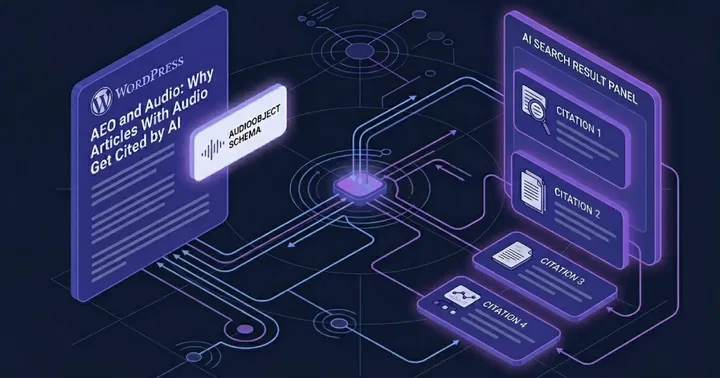
AI search engines can cite WordPress articles directly when those articles contain audio versions marked up with AudioObject JSON-LD schema. Adding audio creates a parallel structured signal that increases the chance of being cited in Perplexity, ChatGPT Search, Google AI Mode, and AI Overviews responses. We have observed TTSWP itself appear as a cited source in Google AI Mode for text to speech wordpress queries, which is the practical proof we will unpack below.
This post is for WordPress publishers, content marketers, and SEO professionals who already understand traditional SEO and now want to expand into AEO. Answer Engine Optimization is the practice of structuring content so AI engines extract and cite it. We focus on one underused lever: audio.
The proof: TTSWP cited in Google AI Mode
We saw it ourselves. A query for text to speech wordpress in Google AI Mode produced an AI-generated overview that listed TTSWP alongside GSpeech and ahead of Amazon Polly. This was not paid placement. Google AI Mode selected the source based on content signals it could parse from our pages. Our 2026 ranking of WordPress TTS plugins breaks down each one's strengths and weaknesses in detail.
The relevant fact: our key articles ship with both Article schema and AudioObject schema. The audio version sits inside the page, the transcript matches the article body, and the duration is declared in ISO 8601 format. We believe this combination is part of why our content was picked up.
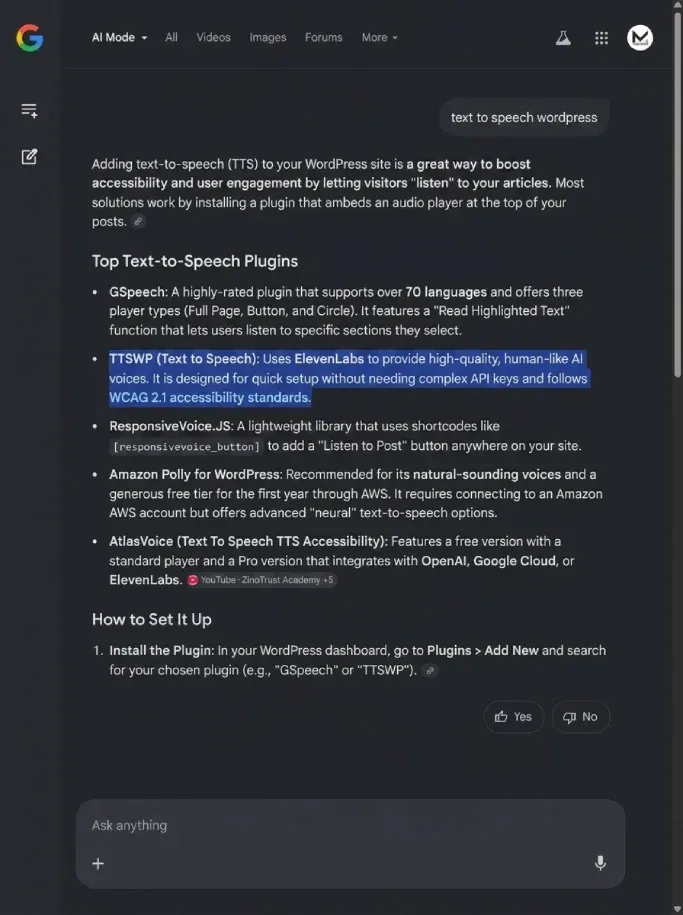
One data point is not a law. But it is a working example a reader can replicate, and that is the practical hook of this post.
How AI search engines parse audio content in 2026
Each engine treats audio differently. We summarize what is publicly known and flag what is unclear.
Perplexity indexes pages and surfaces sources by URL. It reads structured data when present and uses schema to confirm what a page contains. AudioObject helps Perplexity confirm that a page offers a media alternative to text.
ChatGPT Search uses a mix of live web retrieval and indexed pages. It reads JSON-LD when crawling. We see citations cluster around pages with rich structured data.
Google AI Mode and AI Overviews rely on the same underlying index as Google Search. Structured data already supported in Google Search is parsed here, including AudioObject. This is the most direct route from audio markup to AI citation today.
Claude uses search retrieval when given browsing capability. Its citation behavior is less documented. We have seen it cite TTSWP pages in Claude with web search enabled, but we cannot tie that to audio specifically.
The honest summary: Google AI Mode and AI Overviews are the engines most likely to act on AudioObject schema today, because Google already supports it in classic Search. The others benefit indirectly from the same structured signals.
AudioObject JSON-LD: the underused AEO signal
Most WordPress publishers add Article schema and stop there. Adding AudioObject is a five-minute job and creates a second structured signal AI engines can parse.
Here is a complete example you can adapt. Place it inside a <script type="application/ld+json"> tag in your article template.
{
  "@context": "https://schema.org",
  "@type": "AudioObject",
  "name": "AEO and Audio: Why Articles With Audio Get Cited by AI",
  "description": "Audio narration of the article on adding AudioObject schema to WordPress posts.",
  "contentUrl": "https://example.com/audio/aeo-and-audio.mp3",
  "encodingFormat": "audio/mpeg",
  "duration": "PT8M42S",
  "inLanguage": "en",
  "transcript": "https://example.com/blog/aeo-and-audio-ai-citation",
  "isPartOf": {
    "@type": "Article",
    "@id": "https://example.com/blog/aeo-and-audio-ai-citation"
  }
}
Field-by-field, here is what each line does for AI engines:
- name: the human-readable title of the audio. Matches the article title so AI engines pair them.
- contentUrl: the direct URL to the MP3. Must be publicly accessible, not behind login.
- encodingFormat: the MIME type.
audio/mpegfor MP3. - duration: ISO 8601 format.
PT8M42Smeans 8 minutes 42 seconds. Use this format exactly. Plain text like "8:42" is not parsed. - inLanguage: BCP-47 language tag. Tells AI engines which audience to cite this content to. Critical for multilingual sites.
- transcript: a URL to the matching text. Pointing this at the article URL itself signals that the audio is a narration of the page content.
- isPartOf: links the audio to the parent Article. This is the part most publishers miss.
For full implementation details and the WordPress hooks involved, see our guide to adding text to speech in WordPress. The plugin handles AudioObject schema automatically once audio is generated.
Why audio strengthens citation likelihood
AI engines weight content authority. Multiple structured formats compound the signal. A page with Article, AudioObject, and BreadcrumbList schema gives an engine three confirmations of what the page contains and how it relates to a site.
Audio also functions as a soft trust signal. Generating, hosting, and serving audio takes investment. AI engines do not measure investment directly, but the structured output of that investment, a parsed AudioObject with valid duration and contentUrl, suggests a publisher operating at a higher level than a thin-content competitor.
We frame this as likelihood, not guarantee. We see correlations in our own analytics. We cannot promise rankings.
What makes audio content citable
Not every audio file helps AEO equally. Some patterns work, others create friction.
Direct narration of the article text works best. The audio matches the transcript on the page. AI engines confirm the relationship and treat the page as a multi-format source.
Original commentary on top of the article is harder. The audio contains content that does not exist as text anywhere on the page. AI engines cannot transcribe and verify it at scale. The audio still helps accessibility, but it does not strengthen citation the same way.
Short to medium audio (under 15 minutes) is parsed and treated as a meaningful media alternative. Very long audio is harder to align with text and is less reliable as a signal.
Audio behind paywalls or login walls is invisible. If a crawler cannot reach contentUrl, the schema is meaningless.
How to test if AI search engines cite your content
Here is the protocol we use internally. It takes about 30 minutes per topic, plus a one to two week wait for indexing.
- Pick a topic you already cover. Choose an article with strong on-page SEO and at least one audio version. Note the exact URL.
- List three to five queries a reader might type to find that article. Use natural language, not keyword stuffing.
- Search each query on Perplexity, ChatGPT Search, and Google AI Mode separately. Note which sources are cited in the AI response. Screenshot each result.
- Test direct retrieval on Perplexity by pasting your URL into a query with the focus operator. This confirms whether Perplexity has indexed the page.
- Validate your schema using Google's Rich Results Test. Confirm that AudioObject is detected without errors.
- Wait one to two weeks after publishing or updating before retesting. Indexing is not instant.
- Repeat the queries. Compare citation positions before and after. Note which engines now cite you that did not before.
This is not a perfect attribution model. AI engines change. Your competitors change. But the protocol gives you a baseline and a repeatable test you can run quarterly.
Common AEO mistakes WordPress publishers make with audio
We see the same handful of misses across audits. All are fixable in minutes.
- Generating audio but skipping AudioObject schema. The audio plays for users, but AI engines see nothing structured. The signal is wasted.
- Hosting audio behind authentication. Members-only audio cannot be cited. If audio is gated, expose a public preview version with its own schema.
- Skipping
inLanguage. AI engines cannot decide which locale to cite this content to. Multilingual publishers lose the most here. - Using non-ISO duration formats.
8:42,8 min 42 sec, and00:08:42are not parsed. UsePT8M42S. - Not labeling the audio as a narration. Set
transcriptto the article URL andisPartOfto the Article schema. This tells engines the audio is the same content as the text. - Forgetting accessibility alignment. Audio narration also serves WCAG media alternative requirements. See our WCAG audio requirements guide for the overlap between accessibility and AEO signals.
If you are setting this up from scratch, our documentation covers the implementation end to end, including how TTSWP outputs AudioObject schema automatically.
The publisher angle
For bloggers, journalists, online publications, and course creators, audio is doing two jobs at once. It serves readers who prefer to listen, which extends time on page and broadens audience. And it creates structured data that AI engines parse when deciding who to cite.
We work with publishers across the Nordics and Europe through Mementor, our parent agency, and the pattern is consistent. Publishers who add audio with proper schema see more diverse traffic sources within a quarter, including AI-engine referrals that did not exist before. See our publisher use cases for the full pattern.
Frequently asked questions
Does adding audio actually help my AI search rankings?
It increases citation likelihood, not classic rankings. AI search engines like Perplexity, ChatGPT Search, and Google AI Mode select sources to cite in generated answers. Audio with AudioObject schema gives those engines an extra structured signal confirming page authority and content type. We have observed our own pages cited in Google AI Mode after adding audio. We cannot promise the same outcome for every site, but the mechanism is real.
Which AI search engines cite audio content directly?
Google AI Mode and Google AI Overviews are the clearest cases today, because they inherit AudioObject support from Google Search. Perplexity and ChatGPT Search benefit indirectly: they read JSON-LD when crawling, and AudioObject reinforces what a page contains. Claude with web search enabled cites pages with strong structured data, but its audio handling is less documented. We treat Google AI Mode as the primary target.
Do I need a separate transcript file if I have audio?
No. If your audio is a direct narration of the article text, set the transcript field in AudioObject to the article URL itself. This tells AI engines the page text is the transcript. You only need a separate transcript file if the audio contains content not present on the page, such as original commentary or interview material that does not appear in the written article.
Does AudioObject schema replace Article schema or add to it?
It adds to Article schema. Keep your Article JSON-LD intact and publish AudioObject as a second script tag, linked back to the Article via the isPartOf field. Multiple schema types on one page compound the signal AI engines parse. Removing Article schema would weaken your page, not strengthen it. The two formats work together to describe the page as both written content and media.
How long does it take to see citation effects after adding audio?
Plan for one to two weeks of indexing time before testing, and a full quarter to see consistent citation patterns. Google needs to recrawl and reparse your pages. AI engines update their retrieval indexes on different schedules, some daily, some weekly. Run the test protocol described above at one week, four weeks, and twelve weeks after publishing. Compare results across all three intervals.
Where to start
Pick one cornerstone article on your site, generate an audio version, add AudioObject schema, and run the testing protocol two weeks later. One article is enough to confirm the mechanism on your domain. From there, scale to the rest of your library. If you want the schema handled automatically when audio is generated, install the TTSWP plugin and connect it to your site. The AudioObject markup is shipped by default, so there is no manual JSON-LD to maintain.