WCAG 2.2 Audio Compliance for WordPress: 2026 Guide
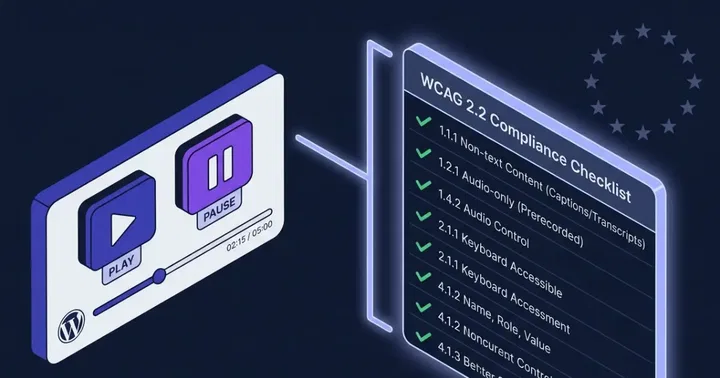
WordPress audio must satisfy at least four WCAG 2.2 success criteria including 1.4.2 Audio Control, 2.1.1 Keyboard, 2.5.8 Target Size (new in 2.2), and 4.1.2 Name, Role, Value. The European Accessibility Act, enforced since 28 June 2025, makes this legally required for any site serving EU customers. The default WordPress audio player and most third-party audio plugins fail several of these requirements without modification.
This guide is the practical checklist we use at Mementor when auditing WordPress sites for WCAG 2.2 conformance. We cover both sides of the audio question: audio as content with its own accessibility rules, and audio as an accessibility feature for text content.
Why audio compliance matters in 2026
Three forces collided in 2025 to make this an urgent topic. The EAA started enforcement on 28 June 2025. The WebAIM Million 2025 report found 96.3% of home pages had detectable WCAG failures. ADA litigation in the United States kept climbing, with WordPress sites featuring prominently in the 4,000-plus web accessibility cases filed during the year.
The pattern we see in our audits is consistent. Site owners assume their theme handles accessibility. The theme inherits whatever the audio plugin ships. The audio plugin ships buttons that are too small, sliders that trap keyboard users, and contrast ratios that fail at the first manual check.
The complete WCAG 2.2 audio checklist
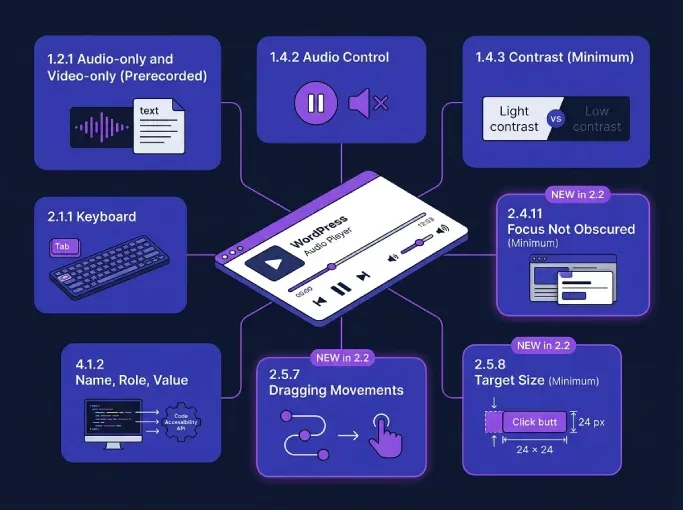
Eight success criteria touch audio on a WordPress site directly. The table below maps each one to what it means in practice, what default WordPress audio gets right or wrong, and how the TTSWP player handles it. Criteria marked NEW arrived with WCAG 2.2 in October 2023.
| Criterion | Level | What it means | Default WP audio | TTSWP player |
|---|---|---|---|---|
| 1.2.1 Audio Alternative | A | Audio-only needs text alternative | Theme dependent | Page text serves as alternative |
| 1.4.2 Audio Control | A | Pause or stop for any audio playing automatically more than 3 seconds | Native browser controls | User-initiated playback only |
| 1.4.3 Contrast (Minimum) | AA | 4.5:1 ratio for player UI text and meaningful icons | Theme dependent | All defaults meet 4.5:1 |
| 2.1.1 Keyboard | A | All controls reachable and operable via keyboard | Browser-dependent | Full keyboard support |
| 2.4.11 Focus Not Obscured NEW | AA | Sticky elements cannot hide focused content | Not applicable | Sticky bar yields on focus conflict |
| 2.5.7 Dragging Movements NEW | AA | Drag interactions need single-pointer alternative | Drag only on slider | Click-to-position plus arrow keys |
| 2.5.8 Target Size NEW | AA | Interactive targets at least 24 by 24 CSS pixels | Theme dependent | All controls 24 pixels or larger |
| 4.1.2 Name, Role, Value | A | Each control exposes accessible name, role, and state | Partial | Full ARIA implementation |
The W3C Media Accessibility User Requirements page is the canonical source for these criteria. We focus on the eight above because they apply to audio players themselves. Captions (1.2.2) and audio description (1.2.3) are also relevant but apply to video, not pure audio narration.
The media alternative for text exception
Here is the rule that ninety-five percent of compliance articles miss. WCAG defines a media alternative for text as media that presents no more information than is already presented in text. When TTS narration reads an existing article, the audio is a media alternative for the page text. The page text itself is the transcript.
This means a TTS audio version of an article does not need a separate transcript file. WebAIM explains this clearly. The catch is that the audio must be clearly labeled as a media alternative so users understand they are not missing information by skipping it. A heading like "Listen to this article" or a player labeled "Audio version of this post" satisfies this.
The exception does not apply if the audio adds commentary, music beds with meaning, or sections not present in text. Pure narration of the page content qualifies. We rely on this regularly when advising publisher clients who worry that adding audio creates new transcript obligations.
What is new for audio in WCAG 2.2
Three new Level AA criteria affect audio players directly.
2.5.8 Target Size (Minimum)
Every interactive control needs a target of at least 24 by 24 CSS pixels. This is the criterion that breaks the most WordPress audio plugins. In our audits of WordPress sites running third-party audio plugins, the skip-back and skip-forward buttons consistently fall short of the threshold. The visual designers optimized for compactness before WCAG 2.2 introduced the 24-pixel rule, and few plugin maintainers have caught up. Default theme styles sometimes shrink the targets further.
The fix is usually padding, not icon size. A 16-pixel SVG icon inside a button with 4 pixels of padding on each side hits the 24-pixel threshold without changing the visual.
2.4.11 Focus Not Obscured
Sticky audio bars at the bottom of the page cover whatever the keyboard user is focused on. If a focused link sits behind the bar, the criterion fails. The fix is either making the bar dismissible, leaving room above the focus target, or using scroll-padding-bottom on the document so focused elements stay visible.
2.5.7 Dragging Movements
Custom scrub bars and volume sliders that only work with drag fail this criterion. Every dragging interaction needs a single-pointer alternative. Click-to-position on a progress bar satisfies it. So does keyboard arrow-key control on a properly built role="slider".
Common WordPress audio failures from real audits
The patterns repeat across client sites. We see four failures most often.
The default WordPress core <audio> block renders the browser native player. Browser-native audio controls have a long history of inconsistent behavior with screen readers, and arrow-key control of the playhead position varies between Chrome, Firefox, and Safari. Users on NVDA or JAWS often hear the timestamps but cannot reliably move position with the keyboard. The fix is wrapping audio in a custom player that exposes role="slider" with proper ARIA value attributes.
Plugin players ship buttons under the 24-pixel threshold. The visual designer optimized for compactness before WCAG 2.2 introduced the rule. Themes then override the plugin styles, which sometimes makes things worse and sometimes better.
Sticky audio bars hide focused content. We have seen this fail on every site that uses a sticky footer player without testing keyboard navigation.
Contrast on waveforms is consistently below 4.5:1. Designers love the soft grey wave on white. Screen readers do not care, but low-vision users do, and 1.4.3 fails.
Building a compliant audio player: the technical checklist
- Wrap the player in
role="region"with anaria-labeldescribing it. - Use a real
<button>for play, pause, skip, and mute. Never<div>with a click handler. - Set
aria-pressedon the play button to expose the toggle state. - Give every control a minimum target of 24 by 24 CSS pixels using padding.
- Make scrubber and volume
role="slider"witharia-valuemin,aria-valuemax, andaria-valuenow, and respond to arrow keys. - Provide click-to-position on the scrubber as a non-drag alternative.
- Test contrast on every text element and meaningful icon at 4.5:1 minimum.
- Ensure focus rings are visible and never clipped by overflow rules.
- If the player is sticky, leave focus room above it or make it dismissible.
- Label TTS narration players as "Audio version of this article" so the media alternative exception applies cleanly.
A minimal accessible play button looks like this.
<div role="region" aria-label="Article audio player">
  <button type="button"
          aria-pressed="false"
          aria-label="Play article narration"
          style="min-width:24px;min-height:24px;padding:8px">
    <svg aria-hidden="true" width="16" height="16">...</svg>
  </button>
  <input type="range"
         aria-label="Playback position"
         min="0" max="100" value="0">
</div>
That is the spine. Style the button, hide the native range visuals if you want a custom track, but keep the underlying semantics.
How TTS narration improves overall WCAG conformance
Audio is an accessibility feature in its own right, not only something that needs to be made accessible. The World Health Organization estimates 1.3 billion people, around 16% of the global population, live with a significant disability. Many of them benefit from multimodal access to text content: people with dyslexia, ADHD, low vision, and various cognitive disabilities read more comfortably with audio alongside text.
Adding text to speech narration is one of the few accessibility investments that helps users before it satisfies an audit. Adding TTS to WordPress takes under 15 minutes with the Text to Speech – TTSWP plugin. The player ships with WCAG 2.1 AA-conformant defaults, 24-pixel-plus targets, keyboard support, and proper ARIA roles.
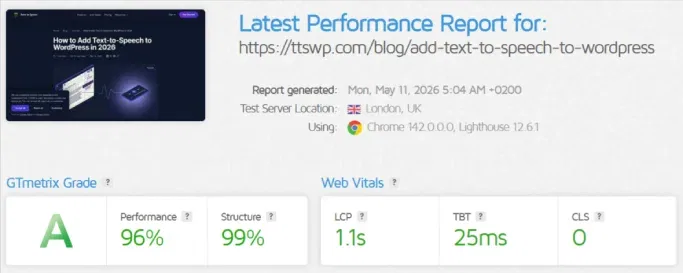
The minimum runtime payload is roughly 35 to 40 KB gzipped (151 KB unminified) covering both the JavaScript player logic and shared CSS. We ran GTmetrix on a published article with the player active and scored Grade A with 93% Performance, 99% Structure, Largest Contentful Paint at 1.3 seconds, Total Blocking Time at 46 milliseconds, and Cumulative Layout Shift at zero. The bundle lazy-loads only on pages that contain the player, so static pages without audio carry no overhead.
The accessibility documentation is at our accessibility trust page. The narration uses the ElevenLabs generative engine, which improves prosody enough that listeners actually finish articles rather than abandoning a robotic read.
The European Accessibility Act in practice
The EAA became enforceable on 28 June 2025. New digital services placed on the EU market after that date must comply now. Existing services have until 28 June 2030 to bring everything into line. The directive applies to any business serving EU customers, regardless of where the business is based.
The technical standard the EAA references is EN 301 549. The current harmonized version (V3.2.1, August 2021) is built on WCAG 2.1 Level AA. Draft V4.1.0 published in November 2025 updates clauses 9, 10, and 11 to align with WCAG 2.2, with final harmonization expected during 2026. Until that update is referenced in the Official Journal of the EU, WCAG 2.1 AA remains the legally binding minimum, but we recommend targeting 2.2 now since the transition is months away rather than years.
Penalties vary by member state. Germany and France have the most active enforcement infrastructure, with national accessibility authorities empowered to investigate complaints and issue fines. We have seen Norwegian and German clients receive formal complaints from end users within months of the enforcement date, usually about audio and form components. The complaints arrive before the fines, so a thirty-day fix window is usually achievable if the team is prepared.
How to test compliance
Automated tools catch roughly 30 to 40 percent of issues. Manual testing is required for the rest, especially keyboard interaction and meaningful contrast on dynamic states.
- NVDA on Windows with Chrome and Firefox. Free.
- JAWS on Windows for enterprise client expectations.
- VoiceOver on macOS and iOS. Built in.
- TalkBack on Android. Built in.
- axe DevTools browser extension for automated scans.
- Lighthouse in Chrome DevTools for quick checks.
- Keyboard-only walkthrough. Unplug the mouse and operate every player control.
The keyboard-only walkthrough is the single highest-leverage test. If the player works without a mouse, most of WCAG 2.2 is already satisfied.
Frequently asked questions
Does WCAG 2.2 require captions for audio podcasts?
No. Captions (1.2.2) apply to prerecorded video with synchronized audio. For audio-only content like podcasts, the relevant criterion is 1.2.1, which requires a text alternative such as a transcript or a detailed summary. Captions and transcripts serve different purposes. A podcast needs the transcript. A video tutorial needs both captions and audio description for visual-only information.
Is auto-playing audio illegal under the EAA?
Not illegal, but restricted. WCAG 1.4.2 Audio Control, which the EAA references through EN 301 549, requires that any audio playing automatically for more than three seconds must offer a pause, stop, or independent volume control. Auto-play without that control fails Level A and creates a non-compliance finding. Most enforcement bodies treat this as a clear violation rather than a borderline case.
Do I need a transcript if I have an audio version of my article?
Usually not. When the audio is a direct narration of the article text and adds no new information, the article text itself is the transcript under the WCAG "media alternative for text" definition. Label the player clearly as an audio version of the article and the exception applies. If the audio includes commentary, music with meaning, or sections not in the text, you do need a separate transcript.
What is the minimum button size for audio players in WCAG 2.2?
Interactive targets must be at least 24 by 24 CSS pixels under success criterion 2.5.8 Target Size (Minimum) at Level AA. The target includes padding, so a 16-pixel icon with 4 pixels of padding on each side meets the requirement. Exceptions exist for inline links in text and controls determined by the user agent, but standalone player buttons get no exception and must hit the threshold.
Does WCAG 2.2 apply to WordPress.com hosted sites?
Yes. WCAG applies to any web content regardless of hosting platform. WordPress.com sites carry the same legal exposure under the EAA, ADA, and equivalent national laws as self-hosted WordPress. The hosting model does not change the obligation. What changes is how much control the site owner has over the player markup. WordPress.com Business and Commerce plans allow custom plugins, lower tiers do not.
Where to start
Pick one post on your site, run a keyboard-only walkthrough of the audio player, and check every button against the 24-pixel rule. That single audit reveals whether your current setup is close to WCAG 2.2 conformance or far from it. From there, the choice is fixing the existing player or replacing it with one that ships compliant by default. Our accessibility documentation covers the configuration we recommend for sites under EAA pressure.