What is Text to Speech? A Plain-Language Guide
Text to Speech (TTS), also called read-aloud technology or speech synthesis, is software that converts written text into spoken audio. A computer reads a sentence, analyzes how it should sound, and outputs an audio file or live playback. Modern AI text to speech systems produce voices that sound close to a human narrator, which is why websites, apps, and assistive tools rely on it every day.
This guide explains what text to speech is, how it works under the hood, what changed when AI voices arrived, and how website owners use it on real WordPress sites. If you want a deeper how-to after reading, our walkthrough on how to add text to speech to WordPress picks up where this article ends.
How does text to speech work?
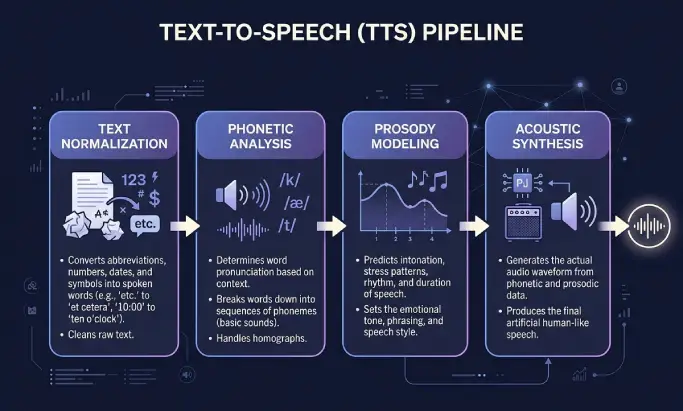
Text to speech works in two stages. The frontend processes the written text, and the backend generates the audio. Most users only see the result, but the steps in between explain why some voices sound flat and others sound human.
Text normalization
The system first cleans the input. It expands abbreviations, decides how to read numbers, dates, currency, and acronyms, and removes formatting that should not be spoken. "Dr. Smith earned $1,200 on 5/12" becomes something the engine can pronounce without guessing.
Phonetic analysis
Next, the engine converts words into phonemes, the smallest units of sound in a language. This is where pronunciation rules, dictionaries, and language models come in. Good systems handle homographs correctly, so "lead" the metal and "lead" the verb sound different in context.
Prosody modeling
Prosody is the rhythm, stress, and intonation of speech. A question rises at the end. A list has small pauses between items. A serious sentence sounds different from a cheerful one. Modeling prosody well is the difference between a robotic reader and a narrator you actually want to listen to.
Acoustic synthesis
Finally, the engine generates the waveform. Older systems stitched together pre-recorded sound fragments. Modern neural and generative engines predict the audio directly from text using deep learning. The output is usually an MP3 or similar audio file at 44.1 kHz, which streams on your site or downloads as a podcast.
From robotic voices to AI voices
Early text to speech systems were concatenative. They glued together small recorded clips of a real speaker, which is why they sounded choppy. Neural TTS replaced that approach with statistical models that predict speech features, giving smoother output. The current generation uses generative AI trained on large speech datasets, which captures prosody, breath, and emotional tone in a way older systems could not.
That shift is why an article published in 2026 can be narrated in a voice most listeners cannot tell apart from a human in casual listening. Our voice library, powered by ElevenLabs, sits in this latest generation. You can preview the available options in the voices documentation.
Who uses text to speech and why?
Text to speech is in more places than most people realize. The same core technology powers very different products.
- Accessibility tools for readers with visual impairment, dyslexia, low literacy, or attention difficulties.
- Audio versions of articles on news sites, blogs, and magazines, so readers can listen while commuting or doing chores.
- E-learning platforms that narrate lessons, quizzes, and study guides in multiple languages.
- Voiceovers for explainer videos, YouTube content, and product demos, replacing the cost of hiring a voice actor for every update.
- WooCommerce product audio that reads descriptions aloud, useful for shoppers on mobile or with reading difficulties. We cover this in detail in our guide to TTS for WooCommerce products.
- Virtual assistants and IVR systems, including the voice you hear from smart speakers, navigation apps, and customer support phone lines.
What are the benefits of text to speech for website owners?
If you run a blog, news site, online store, or course platform, text to speech changes what your content can do. The benefits stack up across accessibility, reach, engagement, and cost.
Accessibility and legal compliance
An audio version of your written content helps users who cannot read the screen comfortably. It supports compliance with the Web Content Accessibility Guidelines and the European Accessibility Act, which took effect for many digital services in June 2025. We break down the practical requirements in our posts on WCAG audio requirements for WordPress and the European Accessibility Act for WordPress sites.
Wider audience reach
Some readers will listen even when they could read. Commuters, parents with small kids, gym users, and people who simply prefer audio all become reachable. You are not replacing the article. You are adding a second way to consume it.
Longer dwell time and engagement
Audio playback keeps users on the page for the length of the article instead of a quick scroll. Even partial listens add measurable time on page, which is a signal both Google and recommendation systems pay attention to. In our setup, posts with audio players see higher average session duration than the same posts without one.
AEO and citation by AI search engines
Answer engines like Google AI Overviews, Perplexity, and ChatGPT Search increasingly cite content that is well-structured and has supporting media. Audio is one of those signals. We wrote a dedicated breakdown of this in why AI search engines favor articles with audio.
Multilingual audio without re-recording
If your site is translated with Weglot, WPML, or Polylang, modern TTS can narrate each language version automatically using a native-sounding voice for that locale. We documented this workflow in our guide to text to speech with Weglot. Re-recording a human voice actor for every language is expensive. Mapping a voice per language takes minutes.
Lower cost than hiring voice actors
A professional narrator for a single 1,500-word article can cost more than a month of generative TTS credits that covers your full blog. For most publishers the math is not close. The trade-off is creative control, which is why some podcasts and brand campaigns still use human talent. For daily articles, AI narration wins.
Text to speech vs speech to text: what is the difference?
Text to speech and speech to text are opposites. Text to speech takes written words and produces audio. Speech to text takes audio and produces written words. They solve different problems and often appear in the same products.
| Capability | Text to Speech (TTS) | Speech to Text (STT) |
|---|---|---|
| Input | Written text | Spoken audio |
| Output | Audio file or live playback | Written transcript |
| Common use | Article narration, voiceovers, assistants | Transcription, dictation, captions, search |
| Also called | Read-aloud, speech synthesis | ASR, voice recognition |
Most modern audio platforms include both. A podcast host might use STT to transcribe an episode and TTS to generate an audio summary in another language.
How do you add text to speech to your own site?
On WordPress, you add text to speech with a plugin. The plugin handles voice selection, automatic generation when you publish, and the audio player your visitors see. Text to Speech - TTSWP is our take on this category, built for publishers rather than developers.
You can compare options in our roundup of the best text to speech plugins for WordPress, or jump straight to what TTSWP can do and pricing. The step-by-step install is covered in our setup guide.
Frequently asked questions
What is text to speech in simple terms?
Text to speech is software that reads written text aloud. You give it a paragraph or article, and it returns an audio file or live playback in a chosen voice and language. It is the same technology behind audio versions of news articles, screen readers, voice assistants, and the announcement voice in navigation apps.
What is text to speech used for?
Text to speech is used for accessibility, audio versions of written content, e-learning narration, voiceovers for videos, product description audio on online stores, and virtual assistants. Websites use it to turn articles into listenable audio. Apps use it to read messages, directions, and alerts. Schools use it to make study material available to more learners.
Is text to speech free?
Some text to speech is free, but quality varies. Operating systems include basic TTS at no cost, and browsers expose a free Web Speech API. These voices sound noticeably robotic. High-quality AI voices from providers like ElevenLabs use a credit model. TTSWP offers a free tier so you can test the experience, then paid plans add more voices, languages, and monthly characters.
Is text to speech the same as a screen reader?
No. A screen reader is an assistive program like NVDA, JAWS, VoiceOver, or TalkBack that reads the entire interface, including menus, links, and form fields. Text to speech is the underlying voice technology a screen reader uses, but TTS by itself only reads the content you point it at, such as the body of an article.
Can I use AI text to speech voices commercially on my blog?
Yes, if your provider licenses the voices for commercial use. ElevenLabs, the engine behind TTSWP, includes commercial rights on paid plans. You should still read the terms for your specific use case, especially for monetized podcasts, ads, or resale of audio. For a standard blog with audio versions of your own articles, commercial use is covered.
How natural do AI text to speech voices sound now?
Modern generative TTS sounds close to a human in casual listening. Most listeners do not flag it as synthetic on the first pass. Long-form narration, expressive dialogue, and heavy accents are still where you can sometimes tell. For news articles, blog posts, and product descriptions, the gap with a human reader is small enough that most publishers consider it solved.
Does text to speech work in languages other than English?
Yes. Quality generative TTS supports dozens of languages with native-sounding voices, including major European, Asian, and Middle Eastern languages. TTSWP maps a voice per language so a multilingual site narrates each translation correctly. You configure this once in settings, and new posts use the right voice automatically.
Where to go from here
If you publish on WordPress and want an audio version of every article without recording anything yourself, the fastest path is to install Text to Speech - TTSWP, connect your site, and pick a voice. You can get started for free and have the first audio file generated within a few minutes. From there, the rest is just writing.